运行时事件循环
ADK Runtime 是在用户交互期间为你的智能体应用程序提供动力的底层引擎。它是一个系统,接收你定义的智能体、工具和回调,并协调它们的执行以响应用户输入,管理信息流、状态变化以及与 LLM 或存储等外部服务的交互。
将 Runtime 视为你的智能体应用程序的"引擎"。你定义部件 (智能体、工具),Runtime 处理它们如何连接和一起运行以满足用户的请求。
核心理念:事件循环
ADK Runtime 的核心是在事件循环上运行。此循环促进 Runner 组件与你定义的"执行逻辑"(包括你的智能体、它们进行的 LLM 调用、回调和工具) 之间的来回通信。
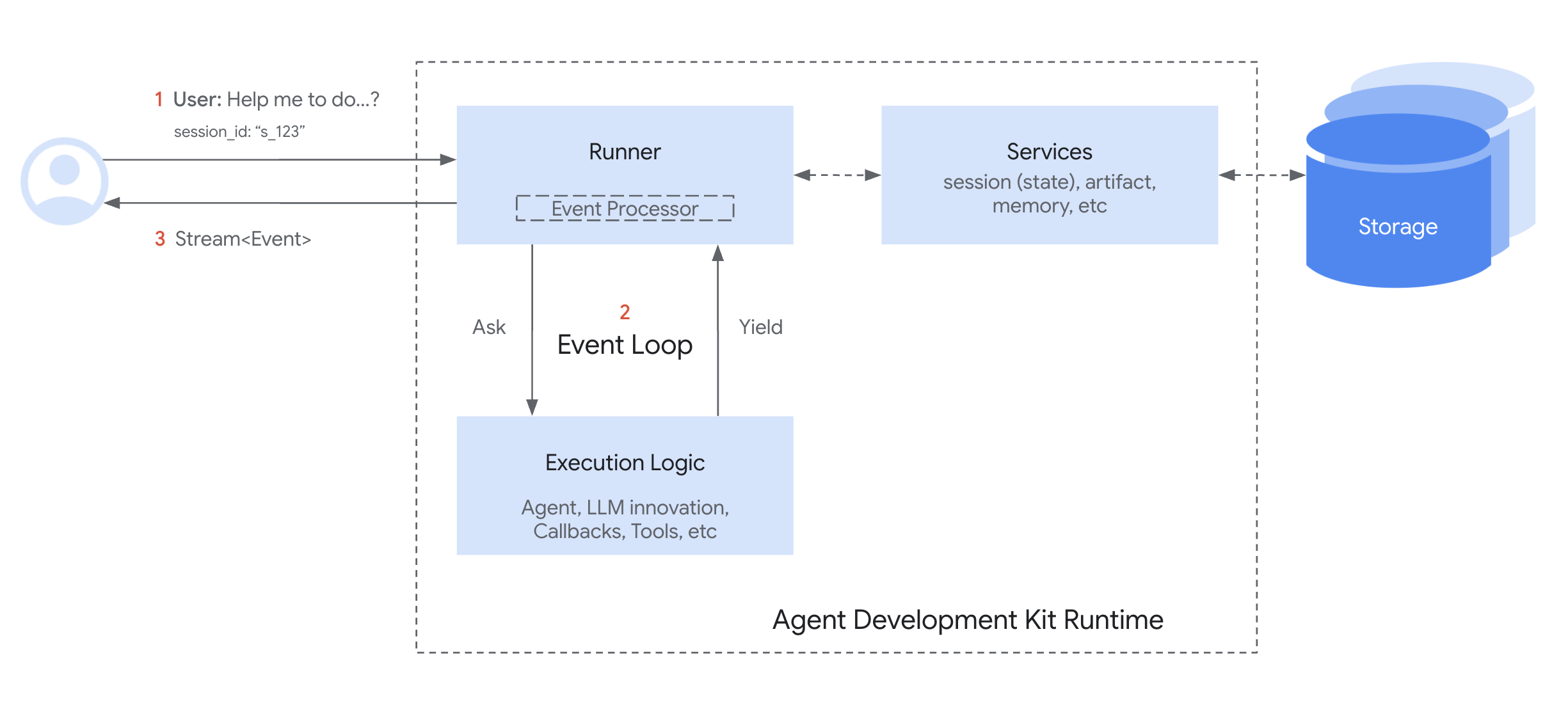
简单来说:
- The
Runnerreceives a user query and asks the mainAgentto start processing. - The
Agent(and its associated logic) runs until it has something to report (like a response, a request to use a tool, or a state change) – it then yields or emits anEvent. - The
Runnerreceives thisEvent, processes any associated actions (like saving state changes viaServices), and forwards the event onwards (e.g., to the user interface). - The
Agent's logic resumes from where it paused only after theRunnerhas processed the event, and then potentially sees the effects of the changes committed by the Runner. - This cycle repeats until the agent has no more events to yield for the current user query.
这种事件驱动的循环是管理 ADK 如何执行你的智能体代码的基本模式。
心跳:事件循环 - 内部工作原理
事件循环是定义 Runner 与你的自定义代码 (智能体、工具、回调,在设计文档中统称为"执行逻辑"或"逻辑组件") 之间交互的核心操作模式。它建立了明确的职责划分:
Note
具体的方法名称和参数名称可能因 SDK 语言而略有不同 (例如,Python 中的 agent.run_async(...),Go 中的 agent.Run(...),Java 和 TypeScript 中的 agent.runAsync(...))。有关详细信息,请参阅特定于语言的 API 文档。
Runner 的角色 (协调器)
Runner 充当单个用户调用的中央协调器。它在循环中的职责是:
- 启动: 接收最终用户的查询 (
new_message),通常通过SessionService将其附加到会话历史记录。 - 启动: 通过调用主智能体的执行方法 (例如,
agent_to_run.run_async(...)) 启动事件生成过程。 - 接收和处理: 等待智能体逻辑
yield或emit一个Event。收到事件后,Runner 立即处理它。这涉及:- 使用配置的
Services(SessionService、ArtifactService、MemoryService) 提交event.actions中指示的更改 (如state_delta、artifact_delta)。 - 执行其他内部记账。
- 使用配置的
- 向上游 Yield: 将处理后的事件转发到上游 (例如,到调用应用程序或 UI 进行渲染)。
- 迭代: 向智能体逻辑发出信号,表示已完成对 yielded 事件的处理,允许它恢复并生成下一个事件。
概念性 Runner 循环:
# Runner 主循环逻辑的简化视图
def run(new_query, ...) -> Generator[Event]:
    # 1. 将 new_query 附加到会话事件历史记录(通过 SessionService)
    session_service.append_event(session, Event(author='user', content=new_query))

    # 2. 通过调用智能体启动事件循环
    agent_event_generator = agent_to_run.run_async(context)

    async for event in agent_event_generator:
        # 3. 处理生成的事件并提交更改
        session_service.append_event(session, event) # 提交 state/artifact deltas 等
        # memory_service.update_memory(...) # 如果适用
        # artifact_service 可能已在智能体运行期间通过 context 调用

        # 4. Yield 事件以进行上游处理(例如,UI 渲染)
        yield event
        # Runner 在 yielding 后隐式地向智能体生成器发出可以继续的信号
// Runner 主循环逻辑的简化视图
async * runAsync(newQuery: Content, ...): AsyncGenerator<Event, void, void> {
    // 1. 将 newQuery 附加到会话事件历史记录(通过 SessionService)
    await sessionService.appendEvent({
        session,
        event: createEvent({author: 'user', content: newQuery})
    });

    // 2. 通过调用智能体启动事件循环
    const agentEventGenerator = agentToRun.runAsync(context);

    for await (const event of agentEventGenerator) {
        // 3. 处理生成的事件并提交更改
        // 提交 state/artifact deltas 等
        await sessionService.appendEvent({session, event});
        // memoryService.updateMemory(...) // 如果适用
        // artifactService 可能已在智能体运行期间通过 context 调用

        // 4. Yield 事件以进行上游处理(例如,UI 渲染)
        yield event;
        // Runner 在 yielding 后隐式地向智能体生成器发出可以继续的信号
    }
}
// Go 中 Runner 主循环逻辑的简化概念视图
func (r *Runner) RunConceptual(ctx context.Context, session *session.Session, newQuery *genai.Content) iter.Seq2[*Event, error] {
    return func(yield func(*Event, error) bool) {
        // 1. 将 new_query 附加到会话事件历史记录(通过 SessionService)
        // ...
        userEvent := session.NewEvent(ctx.InvocationID()) // 为概念视图简化
        userEvent.Author = "user"
        userEvent.LLMResponse = model.LLMResponse{Content: newQuery}

        if _, err := r.sessionService.Append(ctx, &session.AppendRequest{Event: userEvent}); err != nil {
            yield(nil, err)
            return
        }

        // 2. 通过调用智能体启动事件流
        // 假设 agent.Run 也返回 iter.Seq2[*Event, error]
        agentEventsAndErrs := r.agent.Run(ctx, &agent.RunRequest{Session: session, Input: newQuery})

        for event, err := range agentEventsAndErrs {
            if err != nil {
                if !yield(event, err) { // 即使有错误也 yield 事件,然后停止
                    return
                }
                return // 智能体以错误完成
            }

            // 3. 处理生成的事件并提交更改
            // 仅将非部分事件提交到会话服务(如实际代码中所见)
            if !event.LLMResponse.Partial {
                if _, err := r.sessionService.Append(ctx, &session.AppendRequest{Event: event}); err != nil {
                    yield(nil, err)
                    return
                }
            }
            // memory_service.update_memory(...) // 如果适用
            // artifact_service 可能已在智能体运行期间通过 context 调用

            // 4. Yield 事件以进行上游处理
            if !yield(event, nil) {
                return // 上游消费者停止
            }
        }
        // 智能体成功完成
    }
}
// Java 中 Runner 主循环逻辑的简化概念视图
public Flowable<Event> runConceptual(
    Session session,
    InvocationContext invocationContext,
    Content newQuery
    ) {

    // 1. 将 new_query 附加到会话事件历史记录(通过 SessionService)
    // ...
    sessionService.appendEvent(session, userEvent).blockingGet();

    // 2. 通过调用智能体启动事件流
    Flowable<Event> agentEventStream = agentToRun.runAsync(invocationContext);

    // 3. 处理每个生成的事件,提交更改,并 "yield" 或 "emit"
    return agentEventStream.map(event -> {
        // 这会改变会话对象(添加事件,应用 stateDelta)。
        // appendEvent 的返回值(一个 Single<Event>)在概念上
        // 只是处理后的事件本身。
        sessionService.appendEvent(session, event).blockingGet(); // 简化的阻塞调用

        // memory_service.update_memory(...) // 如果适用 - 概念性
        // artifact_service 可能已在智能体运行期间通过 context 调用

        // 4. "Yield" 事件以进行上游处理
        //    在 RxJava 中,在 map 中返回事件实际上将其 yield 给下一个操作符或订阅者。
        return event;
    });
}
执行逻辑的角色 (智能体、工具、回调)
智能体、工具和回调中的代码负责实际的计算和决策。它与循环的交互涉及:
- 执行: 根据当前的
InvocationContext运行其逻辑,包括执行恢复时的会话状态。 - Yield: 当逻辑需要通信 (发送消息、调用工具、报告状态更改) 时,它构造一个包含相关内容和操作的
Event,然后将此事件yield回Runner。 - 暂停: 至关重要的是,智能体逻辑的执行在
yield语句 (或 RxJava 中的return) 之后立即暂停。它等待Runner完成步骤 3(处理和提交)。 - 恢复: 只有在
Runner处理完 yielded 事件后,智能体逻辑才会从紧跟yield的语句恢复执行。 - 查看更新的状态: 恢复后,智能体逻辑现在可以可靠地访问反映从先前 yielded 事件提交的更改的会话状态 (
ctx.session.state)。
概念性执行逻辑:
# Agent.run_async、回调或工具内部逻辑的简化视图

# ... 先前的代码基于当前状态运行 ...

# 1. 确定需要更改或输出,构造事件
# 示例:更新状态
update_data = {'field_1': 'value_2'}
event_with_state_change = Event(
    author=self.name,
    actions=EventActions(state_delta=update_data),
    content=types.Content(parts=[types.Part(text="State updated.")])
    # ... 其他事件字段 ...
)

# 2. 将事件 yield 给 Runner 进行处理和提交
yield event_with_state_change
# <<<<<<<<<<<< 执行在此暂停 >>>>>>>>>>>>

# <<<<<<<<<<<< RUNNER 处理和提交事件 >>>>>>>>>>>>

# 3. 仅在 Runner 完成处理上述事件后恢复执行。
# 现在,Runner 提交的状态得到可靠反映。
# 后续代码可以安全地假设 yielded 事件的更改已发生。
val = ctx.session.state['field_1']
# 这里 `val` 保证是 "value_2"(假设 Runner 成功提交)
print(f"Resumed execution. Value of field_1 is now: {val}")

# ... 后续代码继续 ...
# 可能稍后 yield 另一个事件...
// Agent.runAsync、回调或工具内部逻辑的简化视图

// ... 先前的代码基于当前状态运行 ...

// 1. 确定需要更改或输出,构造事件
// 示例:更新状态
const updateData = {'field_1': 'value_2'};
const eventWithStateChange = createEvent({
    author: this.name,
    actions: createEventActions({stateDelta: updateData}),
    content: {parts: [{text: "State updated."}]}
    // ... 其他事件字段 ...
});

// 2. 将事件 yield 给 Runner 进行处理和提交
yield eventWithStateChange;
// <<<<<<<<<<<< 执行在此暂停 >>>>>>>>>>>>

// <<<<<<<<<<<< RUNNER 处理和提交事件 >>>>>>>>>>>>

// 3. 仅在 Runner 完成处理上述事件后恢复执行。
// 现在,Runner 提交的状态得到可靠反映。
// 后续代码可以安全地假设 yielded 事件的更改已发生。
const val = ctx.session.state['field_1'];
// 这里 `val` 保证是 "value_2"(假设 Runner 成功提交)
console.log(`Resumed execution. Value of field_1 is now: ${val}`);

// ... 后续代码继续 ...
// 可能稍后 yield 另一个事件...
// Agent.Run、回调或工具内部逻辑的简化视图

// ... 先前的代码基于当前状态运行 ...

// 1. 确定需要更改或输出,构造事件
// 示例:更新状态
updateData := map[string]interface{}{"field_1": "value_2"}
eventWithStateChange := &Event{
    Author: self.Name(),
    Actions: &EventActions{StateDelta: updateData},
    Content: genai.NewContentFromText("State updated.", "model"),
    // ... 其他事件字段 ...
}

// 2. 将事件 yield 给 Runner 进行处理和提交
// 在 Go 中,这是通过将事件发送到通道来完成的。
eventsChan <- eventWithStateChange
// <<<<<<<<<<<< 执行在此暂停(概念上) >>>>>>>>>>>>
// 通道另一端的 Runner 将接收并处理事件。
// 智能体的 goroutine 可能会继续,但逻辑流程等待下一个输入或步骤。

// <<<<<<<<<<<< RUNNER 处理和提交事件 >>>>>>>>>>>>

// 3. 仅在 Runner 完成处理上述事件后恢复执行。
// 在真实的 Go 实现中,这可能由智能体接收
// 新的 RunRequest 或指示下一步的 context 来处理。更新的状态
// 将是该新请求中会话对象的一部分。
// 对于这个概念示例,我们只检查状态。
val := ctx.State.Get("field_1")
// 这里 `val` 保证是 "value_2",因为 Runner 会在
// 再次调用智能体之前更新会话状态。
fmt.Printf("Resumed execution. Value of field_1 is now: %v\n", val)

// ... 后续代码继续 ...
// 可能稍后向通道发送另一个事件...
// Simplified view of logic inside Agent.runAsync, callbacks, or tools
// ... previous code runs based on current state ...

// 1. Determine a change or output is needed, construct the event
// Example: Updating state
ConcurrentMap<String, Object> updateData = new ConcurrentHashMap<>();
updateData.put("field_1", "value_2");

EventActions actions = EventActions.builder().stateDelta(updateData).build();
Content eventContent = Content.builder().parts(Part.fromText("State updated.")).build();

Event eventWithStateChange = Event.builder()
    .author(self.name())
    .actions(actions)
    .content(Optional.of(eventContent))
    // ... other event fields ...
    .build();

// 2. "Yield" the event. In RxJava, this means emitting it into the stream.
//    The Runner (or upstream consumer) will subscribe to this Flowable.
//    When the Runner receives this event, it will process it (e.g., call sessionService.appendEvent).
//    The 'appendEvent' in Java ADK mutates the 'Session' object held within 'ctx' (InvocationContext).

// <<<<<<<<<<<< CONCEPTUAL PAUSE POINT >>>>>>>>>>>>
// In RxJava, the emission of 'eventWithStateChange' happens, and then the stream
// might continue with a 'flatMap' or 'concatMap' operator that represents
// the logic *after* the Runner has processed this event.

// To model the "resume execution ONLY after Runner is done processing":
// The Runner's `appendEvent` is usually an async operation itself (returns Single<Event>).
// The agent's flow needs to be structured such that subsequent logic
// that depends on the committed state runs *after* that `appendEvent` completes.

// This is how the Runner typically orchestrates it:
// Runner:
//   agent.runAsync(ctx)
//     .concatMapEager(eventFromAgent ->
//         sessionService.appendEvent(ctx.session(), eventFromAgent) // This updates ctx.session().state()
//             .toFlowable() // Emits the event after it's processed
//     )
//     .subscribe(processedEvent -> { /* UI renders processedEvent */ });

// So, within the agent's own logic, if it needs to do something *after* an event it yielded
// has been processed and its state changes are reflected in ctx.session().state(),
// that subsequent logic would typically be in another step of its reactive chain.

// For this conceptual example, we'll emit the event, and then simulate the "resume"
// as a subsequent operation in the Flowable chain.

return Flowable.just(eventWithStateChange) // Step 2: Yield the event
    .concatMap(yieldedEvent -> {
        // <<<<<<<<<<<< RUNNER CONCEPTUALLY PROCESSES & COMMITS THE EVENT >>>>>>>>>>>>
        // At this point, in a real runner, ctx.session().appendEvent(yieldedEvent) would have been called
        // by the Runner, and ctx.session().state() would be updated.
        // Since we are *inside* the agent's conceptual logic trying to model this,
        // we assume the Runner's action has implicitly updated our 'ctx.session()'.

        // 3. Resume execution.
        // Now, the state committed by the Runner (via sessionService.appendEvent)
        // is reliably reflected in ctx.session().state().
        Object val = ctx.session().state().get("field_1");
        // here `val` is guaranteed to be "value_2" because the `sessionService.appendEvent`
        // called by the Runner would have updated the session state within the `ctx` object.

        System.out.println("Resumed execution. Value of field_1 is now: " + val);

        // ... subsequent code continues ...
        // If this subsequent code needs to yield another event, it would do so here.
Runner 和你的执行逻辑之间通过 Event 对象介导的这种协作 yield/暂停/恢复循环构成了 ADK Runtime 的核心。
Runtime 的关键组件
ADK Runtime 中的几个组件协同工作以执行智能体调用。了解它们的角色可以阐明事件循环如何运作:
-
Runner¶- 角色: 单个用户查询的主要入口点和协调器 (
run_async)。 - 功能: 管理整体事件循环,接收执行逻辑 yielded 的事件,与 Services 协调以处理和提交事件操作 (状态/工件更改),并将处理后的事件转发到上游 (例如,到 UI)。它本质上基于 yielded 事件逐轮驱动对话。(在
google.adk.runners.runner中定义)。
- 角色: 单个用户查询的主要入口点和协调器 (
-
执行逻辑组件
- 角色: 包含你的自定义代码和核心智能体功能的部分。
- 组件:
Agent(BaseAgent、LlmAgent等):处理信息并决定操作的主要逻辑单元。它们实现_run_async_impl方法,该方法 yields 事件。Tools(BaseTool、FunctionTool、AgentTool等):智能体 (通常是LlmAgent) 用来与外部世界交互或执行特定任务的外部函数或功能。它们执行并返回结果,然后将其包装在事件中。Callbacks(函数):附加到智能体的用户定义函数 (例如,before_agent_callback、after_model_callback),它们钩入执行流程中的特定点,可能修改行为或状态,其效果在事件中捕获。- 功能: 执行实际的思考、计算或外部交互。它们通过 yielding
Event对象并暂停直到 Runner 处理它们来传达其结果或需求。
-
Event¶- 角色: 在
Runner和执行逻辑之间来回传递的消息。 - 功能: 表示原子事件 (用户输入、智能体文本、工具调用/结果、状态更改请求、控制信号)。它携带事件的内容和预期的副作用 (
actions,如state_delta)。
- 角色: 在
-
Services¶- 角色: 负责管理持久或共享资源的后端组件。主要由
Runner在事件处理期间使用。 - 组件:
SessionService(BaseSessionService、InMemorySessionService等):管理Session对象,包括保存/加载它们,将state_delta应用于会话状态,以及将事件附加到event history。ArtifactService(BaseArtifactService、InMemoryArtifactService、GcsArtifactService等):管理二进制工件数据的存储和检索。虽然save_artifact在执行逻辑期间通过 context 调用,但事件中的artifact_delta确认了 Runner/SessionService 的操作。MemoryService(BaseMemoryService等):(可选) 管理用户跨会话的长期语义记忆。- 功能: 提供持久层。
Runner与它们交互以确保event.actions发出的更改在执行逻辑恢复之前可靠地存储。
- 角色: 负责管理持久或共享资源的后端组件。主要由
-
Session¶- 角色: 一个数据容器,保存一个特定对话在用户和应用程序之间的状态和历史记录。
- 功能: 存储当前的
state字典、所有过去events的列表 (event history) 以及对关联工件的引用。它是交互的主要记录,由SessionService管理。
-
Invocation¶- 角色: 一个概念术语,表示响应单个用户查询发生的所有事情,从
Runner接收它的那一刻到智能体逻辑完成为该查询 yielding 事件。 - 功能: 一次调用可能涉及多个智能体运行 (如果使用智能体转移或
AgentTool)、多个 LLM 调用、工具执行和回调执行,所有这些都通过InvocationContext中的单个invocation_id联系在一起。以temp:为前缀的状态变量严格限定在单个调用范围内,之后被丢弃。
- 角色: 一个概念术语,表示响应单个用户查询发生的所有事情,从
这些参与者通过事件循环持续交互以处理用户的请求。
它如何工作:简化的调用
让我们追踪一个典型用户查询的简化流程,该查询涉及调用工具的 LLM 智能体:
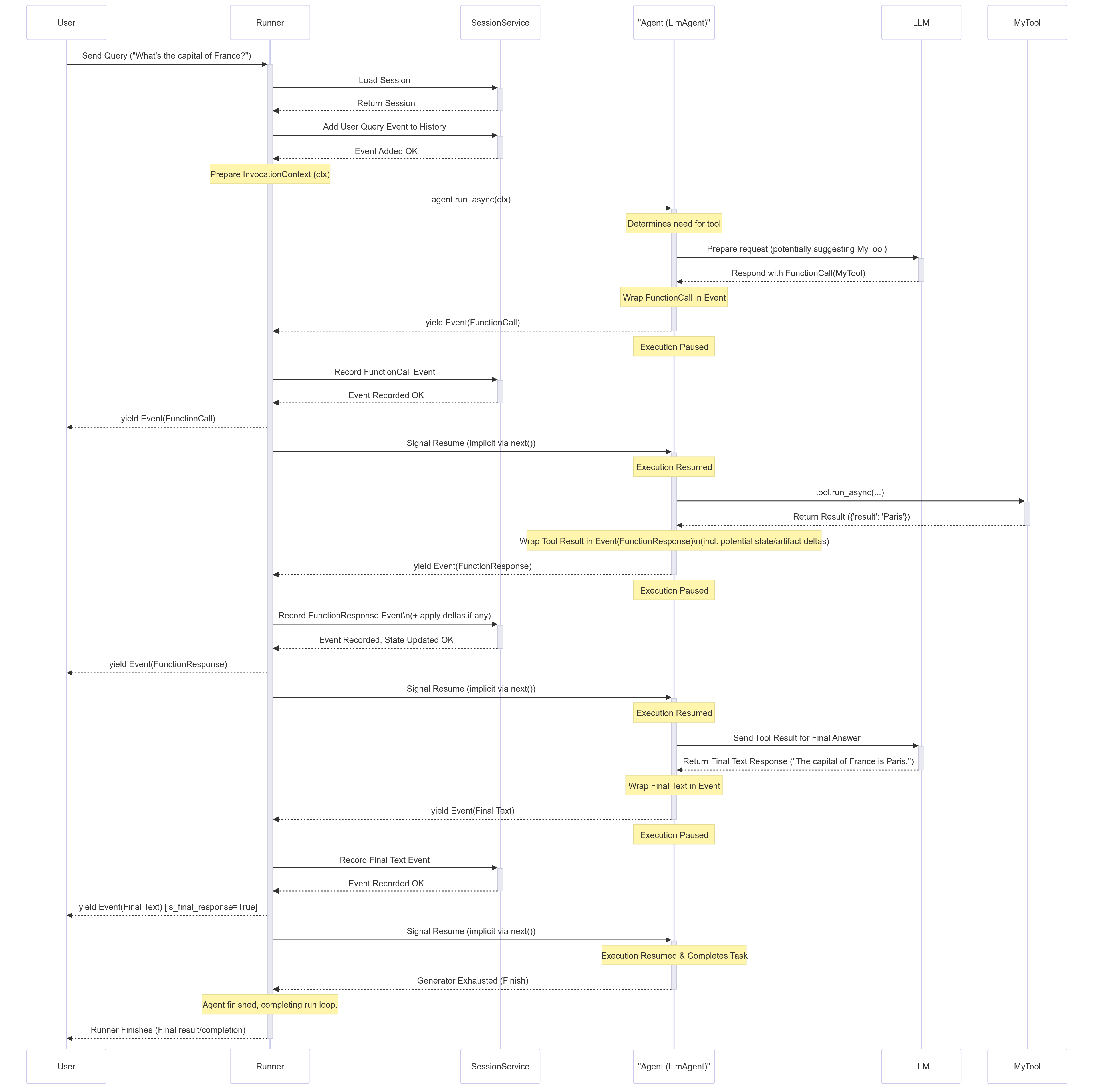
逐步分解
- 用户输入: 用户发送查询 (例如,"法国的首都是什么?")。
- Runner 启动:
Runner.run_async开始。它与SessionService交互以加载相关的Session,并将用户查询作为第一个Event添加到会话历史记录。准备一个InvocationContext(ctx)。 - 智能体执行:
Runner在指定的根智能体 (例如,LlmAgent) 上调用agent.run_async(ctx)。 - LLM 调用 (示例):
Agent_Llm确定它需要信息,可能通过调用工具。它为LLM准备请求。假设 LLM 决定调用MyTool。 - Yield FunctionCall 事件:
Agent_Llm从 LLM 接收FunctionCall响应,将其包装在Event(author='Agent_Llm', content=Content(parts=[Part(function_call=...)]))中,并yields或emits此事件。 - 智能体暂停:
Agent_Llm的执行在yield后立即暂停。 - Runner 处理:
Runner接收 FunctionCall 事件。它将其传递给SessionService以记录在历史记录中。然后Runner将事件 yield 到上游给User(或应用程序)。 - 智能体恢复:
Runner发出事件已处理的信号,Agent_Llm恢复执行。 - 工具执行:
Agent_Llm的内部流程现在继续执行请求的MyTool。它调用tool.run_async(...)。 - 工具返回结果:
MyTool执行并返回其结果 (例如,{'result': 'Paris'})。 - Yield FunctionResponse 事件: 智能体 (
Agent_Llm) 将工具结果包装到包含FunctionResponse部分的Event中 (例如,Event(author='Agent_Llm', content=Content(role='user', parts=[Part(function_response=...)]))。如果工具修改了状态 (state_delta) 或保存了工件 (artifact_delta),此事件也可能包含actions。智能体yield此事件。 - 智能体暂停:
Agent_Llm再次暂停。 - Runner 处理:
Runner接收 FunctionResponse 事件。它将其传递给SessionService,后者应用任何state_delta/artifact_delta并将事件添加到历史记录。Runner将事件 yield 到上游。 - 智能体恢复:
Agent_Llm恢复,现在知道工具结果和任何状态更改已提交。 - 最终 LLM 调用 (示例):
Agent_Llm将工具结果发送回LLM以生成自然语言响应。 - Yield 最终文本事件:
Agent_Llm从LLM接收最终文本,将其包装在Event(author='Agent_Llm', content=Content(parts=[Part(text=...)]))中,并yield它。 - 智能体暂停:
Agent_Llm暂停。 - Runner 处理:
Runner接收最终文本事件,将其传递给SessionService以记录历史,并将其 yield 到上游给User。这可能被标记为is_final_response()。 - 智能体恢复并完成:
Agent_Llm恢复。完成此调用的任务后,其run_async生成器完成。 - Runner 完成:
Runner看到智能体的生成器已耗尽,并完成此调用的循环。
这种 yield/暂停/处理/恢复循环确保状态更改得到一致应用,并且执行逻辑在 yielding 事件后始终在最近提交的状态上运行。
重要的 Runtime 行为
了解 ADK Runtime 如何处理状态、流式传输和异步操作的几个关键方面对于构建可预测和高效的智能体至关重要。
状态更新和提交时机
-
规则: 当你的代码 (在智能体、工具或回调中) 修改会话状态 (例如,
context.state['my_key'] = 'new_value') 时,此更改最初记录在当前InvocationContext中的本地。该更改仅在携带相应state_delta的Event在其actions中被你的代码yield并随后由Runner处理之后才保证被持久化(由SessionService保存)。 -
含义: 从
yield恢复后运行的代码可以可靠地假设在 yielded 事件中发出的状态更改已提交。
# 智能体逻辑内部(概念性)

# 1. 修改状态
ctx.session.state['status'] = 'processing'
event1 = Event(..., actions=EventActions(state_delta={'status': 'processing'}))

# 2. Yield 带有 delta 的事件
yield event1
# --- 暂停 --- Runner 处理 event1,SessionService 提交 'status' = 'processing' ---

# 3. 恢复执行
# 现在可以安全地依赖已提交的状态
current_status = ctx.session.state['status'] # 保证是 'processing'
print(f"Status after resuming: {current_status}")
// 智能体逻辑内部(概念性)

// 1. 修改状态
// 在 TypeScript 中,你通过 context 修改状态,它会跟踪更改。
ctx.state.set('status', 'processing');
// 框架将自动从 context 填充 actions 与状态
// delta。为了说明,这里显示它。
const event1 = createEvent({
    actions: createEventActions({stateDelta: {'status': 'processing'}}),
    // ... 其他事件字段
});

// 2. Yield 带有 delta 的事件
yield event1;
// --- 暂停 --- Runner 处理 event1,SessionService 提交 'status' = 'processing' ---

// 3. 恢复执行
// 现在可以安全地依赖会话对象中已提交的状态。
const currentStatus = ctx.session.state['status']; // 保证是 'processing'
console.log(`Status after resuming: ${currentStatus}`);
  // Inside agent logic (conceptual)

func (a *Agent) RunConceptual(ctx agent.InvocationContext) iter.Seq2[*session.Event, error] {
  // The entire logic is wrapped in a function that will be returned as an iterator.
  return func(yield func(*session.Event, error) bool) {
      // ... previous code runs based on current state from the input `ctx` ...
      // e.g., val := ctx.State().Get("field_1") might return "value_1" here.

      // 1. Determine a change or output is needed, construct the event
      updateData := map[string]interface{}{"field_1": "value_2"}
      eventWithStateChange := session.NewEvent(ctx.InvocationID())
      eventWithStateChange.Author = a.Name()
      eventWithStateChange.Actions = &session.EventActions{StateDelta: updateData}
      // ... other event fields ...


      // 2. Yield the event to the Runner for processing & commit.
      // The agent's execution continues immediately after this call.
      if !yield(eventWithStateChange, nil) {
          // If yield returns false, it means the consumer (the Runner)
          // has stopped listening, so we should stop producing events.
          return
      }

      // <<<<<<<<<<<< RUNNER PROCESSES & COMMITS THE EVENT >>>>>>>>>>>>
      // This happens outside the agent, after the agent's iterator has
      // produced the event.

      // 3. The agent CANNOT immediately see the state change it just yielded.
      // The state is immutable within a single `Run` invocation.
      val := ctx.State().Get("field_1")
      // `val` here is STILL "value_1" (or whatever it was at the start).
      // The updated state ("value_2") will only be available in the `ctx`
      // of the *next* `Run` invocation in a subsequent turn.

      // ... subsequent code continues, potentially yielding more events ...
      finalEvent := session.NewEvent(ctx.InvocationID())
      finalEvent.Author = a.Name()
      // ...
      yield(finalEvent, nil)
  }
}
// Inside agent logic (conceptual)
// ... previous code runs based on current state ...

// 1. Prepare state modification and construct the event
ConcurrentHashMap<String, Object> stateChanges = new ConcurrentHashMap<>();
stateChanges.put("status", "processing");

EventActions actions = EventActions.builder().stateDelta(stateChanges).build();
Content content = Content.builder().parts(Part.fromText("Status update: processing")).build();

Event event1 = Event.builder()
    .actions(actions)
    // ...
    .build();

// 2. Yield event with the delta
return Flowable.just(event1)
    .map(
        emittedEvent -> {
            // --- CONCEPTUAL PAUSE & RUNNER PROCESSING ---
            // 3. Resume execution (conceptually)
            // Now it's safe to rely on the committed state.
            String currentStatus = (String) ctx.session().state().get("status");
            System.out.println("Status after resuming (inside agent logic): " + currentStatus); // Guaranteed to be 'processing'

            // The event itself (event1) is passed on.
            // If subsequent logic within this agent step produced *another* event,
            // you'd use concatMap to emit that new event.
            return emittedEvent;
        });

// ... subsequent agent logic might involve further reactive operators
// or emitting more events based on the now-updated `ctx.session().state()`.
"Dirty Reads" of Session State
- Definition: While commitment happens after the yield, code running later within the same invocation, but before the state-changing event is actually yielded and processed, can often see the local, uncommitted changes. This is sometimes called a "dirty read".
- Example:
# Code in before_agent_callback
callback_context.state['field_1'] = 'value_1'
# State is locally set to 'value_1', but not yet committed by Runner

# ... agent runs ...

# Code in a tool called later *within the same invocation*
# Readable (dirty read), but 'value_1' isn't guaranteed persistent yet.
val = tool_context.state['field_1'] # 'val' will likely be 'value_1' here
print(f"Dirty read value in tool: {val}")

# Assume the event carrying the state_delta={'field_1': 'value_1'}
# is yielded *after* this tool runs and is processed by the Runner.
// Code in beforeAgentCallback
callbackContext.state.set('field_1', 'value_1');
// State is locally set to 'value_1', but not yet committed by Runner

// --- agent runs ... ---

// --- Code in a tool called later *within the same invocation* ---
// Readable (dirty read), but 'value_1' isn't guaranteed persistent yet.
const val = toolContext.state.get('field_1'); // 'val' will likely be 'value_1' here
console.log(`Dirty read value in tool: ${val}`);

// Assume the event carrying the state_delta={'field_1': 'value_1'}
// is yielded *after* this tool runs and is processed by the Runner.
// Code in before_agent_callback
// The callback would modify the context's session state directly.
// This change is local to the current invocation context.
ctx.State.Set("field_1", "value_1")
// State is locally set to 'value_1', but not yet committed by Runner

// ... agent runs ...

// Code in a tool called later *within the same invocation*
// Readable (dirty read), but 'value_1' isn't guaranteed persistent yet.
val := ctx.State.Get("field_1") // 'val' will likely be 'value_1' here
fmt.Printf("Dirty read value in tool: %v\n", val)

// Assume the event carrying the state_delta={'field_1': 'value_1'}
// is yielded *after* this tool runs and is processed by the Runner.
// Modify state - Code in BeforeAgentCallback
// AND stages this change in callbackContext.eventActions().stateDelta().
callbackContext.state().put("field_1", "value_1");

// --- agent runs ... ---

// --- Code in a tool called later *within the same invocation* ---
// Readable (dirty read), but 'value_1' isn't guaranteed persistent yet.
Object val = toolContext.state().get("field_1"); // 'val' will likely be 'value_1' here
System.out.println("Dirty read value in tool: " + val);
// Assume the event carrying the state_delta={'field_1': 'value_1'}
// is yielded *after* this tool runs and is processed by the Runner.
- 含义:
- 好处: 允许单个复杂步骤中的不同部分逻辑 (例如,下一个 LLM 轮次之前的多个回调或工具调用) 使用状态进行协调,而无需等待完整的 yield/提交循环。
- 警告: 对关键逻辑严重依赖脏读可能有风险。如果调用在携带
state_delta的事件 yielded 并由Runner处理之前失败,未提交的状态更改将丢失。对于关键状态转换,确保它们与成功处理的事件相关联。
流式与非流式输出 (partial=True)
这主要涉及如何处理来自 LLM 的响应,特别是在使用流式生成 API 时。
- 流式传输: LLM 逐个令牌或以小块生成其响应。
- 框架 (通常在
BaseLlmFlow内) 为单个概念响应 yields 多个Event对象。这些事件中的大多数将具有partial=True。 Runner在接收到partial=True的事件时,通常立即将其转发到上游 (用于 UI 显示),但跳过处理其actions(如state_delta)。- 最终,框架为该响应 yields 一个最终事件,标记为非部分 (
partial=False或通过turn_complete=True隐式)。 Runner仅完全处理此最终事件,提交任何关联的state_delta或artifact_delta。- 非流式传输: LLM 一次生成整个响应。框架 yields 一个标记为非部分的单个事件,
Runner完全处理它。 - 为什么重要: 确保状态更改基于来自 LLM 的完整响应原子地且仅应用一次,同时仍允许 UI 在生成时逐步显示文本。
异步是主要的 (run_async)
- 核心设计: ADK Runtime 从根本上建立在异步模式和库 (如 Python 的
asyncio、Java 的RxJava以及 TypeScript 中的原生Promise和AsyncGenerator) 之上,以高效处理并发操作 (如等待 LLM 响应或工具执行) 而不阻塞。 - 主要入口点:
Runner.run_async是执行智能体调用的主要方法。所有核心可运行组件 (智能体、特定流程) 内部使用asynchronous方法。 - 同步便利 (
run): 同步Runner.run方法主要为了方便 (例如,在简单脚本或测试环境中) 而存在。但是,在内部,Runner.run通常只是调用Runner.run_async并为你管理异步事件循环执行。 - 开发者体验: 我们建议设计你的应用程序 (例如,使用 ADK 的 Web 服务器) 为异步以获得最佳性能。在 Python 中,这意味着使用
asyncio;在 Java 中,利用RxJava的响应式编程模型;在 TypeScript 中,这意味着使用原生Promise和AsyncGenerator进行构建。 - 同步回调/工具: ADK 框架支持工具和回调的异步和同步函数。
- 阻塞 I/O: 对于长时间运行的同步 I/O 操作,框架尝试防止停顿。Python ADK 可能使用 asyncio.to_thread,而 Java ADK 通常依赖适当的 RxJava 调度器或阻塞调用的包装器。在 TypeScript 中,框架只是等待函数;如果同步函数执行阻塞 I/O,它将停顿事件循环。开发者应尽可能使用异步 I/O API(返回 Promise)。
- CPU 密集型工作: 纯 CPU 密集型同步任务在两种环境中仍会阻塞其执行线程。
了解这些行为有助于你编写更健壮的 ADK 应用程序并调试与状态一致性、流式更新和异步执行相关的问题。 ```