获取 ADK 工具的操作确认
某些智能体工作流需要确认来进行决策、验证、安全或一般监督。在这些情况下,你希望在工作流继续之前从人类或监督系统获得响应。智能体开发工具包(ADK)中的 工具确认 功能允许 ADK 工具暂停其执行,并与用户或其他系统交互以获得确认或在继续之前收集结构化数据。你可以通过以下方式在 ADK 工具中使用工具确认:
你可以配置如何向用户传达请求,系统也可以使用通过 ADK 服务器的 REST API 发送的远程响应。当在 ADK Web 用户界面中使用确认功能时,智能体工作流会向用户显示一个对话框来请求输入,如图 1 所示:
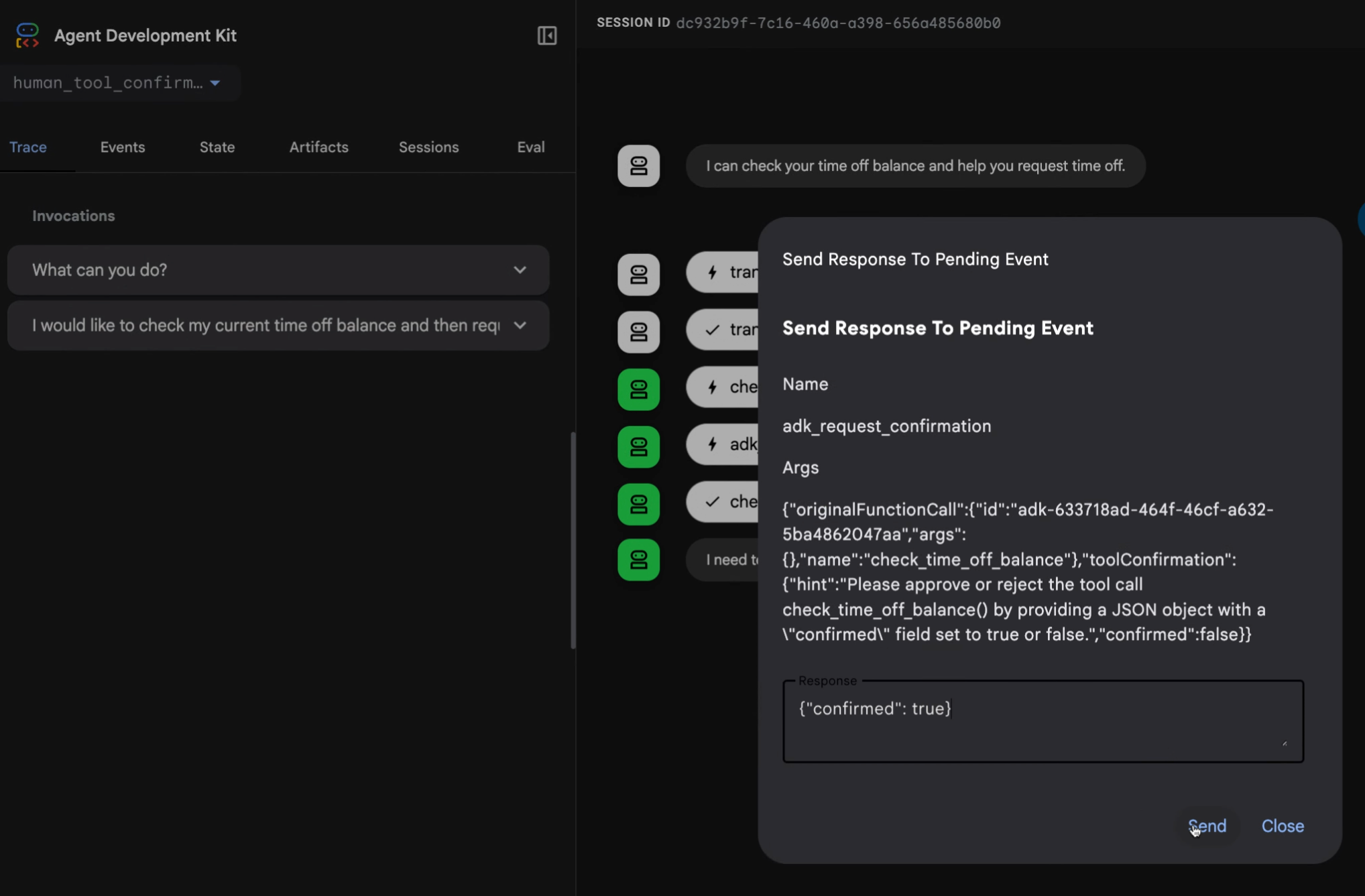
图 1。 使用高级工具响应实现的确认响应请求对话框示例。
以下章节描述了如何在确认场景中使用此功能。有关完整的代码示例,请参阅 human_tool_confirmation 示例。还有其他方法可以将人工输入集成到你的智能体工作流中,更多详细信息,请参阅人在回路 (Human-in-the-loop) 智能体模式。
布尔确认
当你的工具只需要用户简单的 yes 或 no 回复时,你可以
添加一个确认步骤。在 Python、Go 和 Java 中,你可以通过
使用 FunctionTool 类包装工具并将
require_confirmation 参数(或等效参数)设置为 True 来启用此功能。在 Kotlin 中,你在
工具函数的 @Tool 注解上设置 requireConfirmation = true。在
TypeScript 中,你需要在 execute 函数中使用 ToolContext
手动实现此逻辑。
以下示例展示了如何启用布尔确认:
root_agent = Agent(
    # ...
    tools = [
        # 将 require_confirmation 设置为 True 以要求用户确认工具调用。
        FunctionTool(reimburse, require_confirmation=True),
    ],
    # ...
)

# 此实现方法需要最少的代码,但仅限于来自用户或确认系统的简单
# 审批。有关此方法的完整示例,请参阅以下代码示例以获取更详细的示例:
# https://github.com/google/adk-python/blob/main/contributing/samples/hitl/human_tool_confirmation/agent.py
Note
ADK TypeScript 版本目前需要在工具的 execute 函数中手动实现确认逻辑。
/**
 * A reimbursement tool with dynamic confirmation logic.
 */
export const reimburseTool = new FunctionTool({
  name: 'reimburse',
  description: 'Reimburse an amount. Large amounts (>1000) require manager approval.',
  parameters: z.object({
    amount: z.coerce.number().describe('The amount to reimburse.'),
  }),
  execute: async ({amount}, toolContext) => {
    // 1. Check if we already have a confirmed response.
    if (toolContext?.toolConfirmation?.confirmed) {
      const isLarge = amount > 1000;
      return {
        status: 'SUCCESS',
        message: isLarge
          ? `Large reimbursement of ${amount} approved by manager and processed.`
          : `Reimbursement of ${amount} has been successfully processed.`,
      };
    }

    // 2. Request a tool confirmation.
    const isLarge = amount > 1000;
    toolContext?.requestConfirmation({
      hint: isLarge
        ? `The amount ${amount} exceeds the $1000 limit and requires manager approval.`
        : `Do you want to reimburse ${amount}?`,
      payload: {amount},
    });

    // 3. Return a status that tells the agent we are waiting.
    // Note: The model won't see this until the turn resumes after confirmation.
    return {
      status: isLarge ? 'AWAITING_MANAGER_APPROVAL' : 'AWAITING_CONFIRMATION',
      message: 'This request requires approval to proceed.',
    };
  },
});

export const rootAgent = new LlmAgent({
  name: 'Finance_Assistant',
  model: 'gemini-flash-latest',
  instruction: `You are a Finance Assistant.
  - You MUST use the 'reimburse' tool for ALL reimbursement requests.
  - MANDATORY: Every tool call MUST be accompanied by a text response in the same message.
  - THRESHOLD LOGIC:
    - For amounts <= 1000: Say "I am initiating the reimbursement request for [amount]. Please confirm it to proceed."
    - For amounts > 1000: Say "I am initiating the reimbursement request for [amount]. Since this exceeds $1000, manager approval is required. Please confirm the request to submit it for review."
  - EXAMPLES:
    User: "Reimburse me $45"
    Model: "I am initiating the reimbursement request for 45. Please confirm it to proceed." [Tool Call: reimburse(amount=45)]

    User: "Reimburse me $2500"
    Model: "I am initiating the reimbursement request for 2500. Since this exceeds $1000, manager approval is required. Please confirm the request to submit it for review." [Tool Call: reimburse(amount=2500)]
  - If the user provides a currency symbol (like $), ignore it and pass only the number to the tool.
  - In the Web UI, the user will see a 'Confirm' button. In the terminal, the user should simulate a confirmation response.`,
  tools: [reimburseTool],
});
reimburseTool, _ := functiontool.New(functiontool.Config{
    Name:        "reimburse",
    Description: "Reimburse an amount",
    // 将 RequireConfirmation 设置为 true,以要求用户对该工具调用
    // 进行确认。
    RequireConfirmation: true,
}, func(ctx agent.Context, args ReimburseArgs) (ReimburseResult, error) {
    // 实际实现
    return ReimburseResult{Status: "ok"}, nil
})

rootAgent, _ := llmagent.New(llmagent.Config{
    // ...
    Tools: []tool.Tool{reimburseTool},
})
class ReimbursementTools {
    /** Reimburse an amount. */
    @Tool(requireConfirmation = true) // Pause for user confirmation before every call.
    fun reimburse(
        @Param("The amount to reimburse.") amount: Int,
    ): Map<String, Any?> = mapOf("status" to "ok", "reimbursedAmount" to amount)
}

val reimbursementAgent =
    LlmAgent(
        name = "reimbursement_agent",
        model = Gemini(name = "gemini-flash-latest"),
        tools = ReimbursementTools().generatedTools(),
    )
条件确认函数
你可以使用一个基于工具输入返回布尔值的函数来修改确认要求的行为。在 TypeScript 中,这通过在 execute 函数中添加条件逻辑来处理。在 Kotlin 中,@Tool 注解的标志是编译时常量,因此条件逻辑放在工具函数内部。
reimburseTool, _ := functiontool.New(functiontool.Config{
    Name:        "reimburse",
    Description: "Reimburse an amount",
    // RequireConfirmationProvider 允许动态判断
    // 是否需要用户确认。
    RequireConfirmationProvider: func(args ReimburseArgs) bool {
        return args.Amount > 1000
    },
}, func(ctx agent.Context, args ReimburseArgs) (ReimburseResult, error) {
    // 实际实现
    return ReimburseResult{Status: "ok"}, nil
})
// 在 ADK Java 中,动态阈值确认逻辑直接在工具逻辑内部
// 使用 ToolContext 进行评估,而不是通过 lambda 参数传入。
public Map<String, Object> reimburse(
    @Schema(name="amount") int amount, ToolContext toolContext) {

  // 1. 动态阈值检查
  if (amount > 1000) {
    Optional<ToolConfirmation> toolConfirmation = toolContext.toolConfirmation();
    if (toolConfirmation.isEmpty()) {
       toolContext.requestConfirmation("Amount > 1000 requires approval.");
       return Map.of("status", "Pending manager approval.");
    } else if (!toolConfirmation.get().confirmed()) {
       return Map.of("status", "Reimbursement rejected.");
    }
  }

  // 2. 继续执行实际的工具逻辑
  return Map.of("status", "ok", "reimbursedAmount", amount);
}

LlmAgent rootAgent = LlmAgent.builder()
    // ...
    .tools(
        // 此处未设置 requireConfirmation 标志,因为自定义阈值
        // 逻辑已经在该方法内部处理了!
        FunctionTool.create(this, "reimburse")
    )
    // ...
    .build();
class ReimbursementTools {
    /** Reimburse an amount, requiring manager approval above a threshold. */
    @Tool
    fun reimburse(
        context: ToolContext,
        @Param("The amount to reimburse.") amount: Int,
    ): Map<String, Any?> {
        // The @Tool annotation's requireConfirmation flag is a compile-time constant,
        // so the threshold is evaluated here using the ToolContext instead.
        if (amount > 1000) {
            val confirmation = context.toolConfirmation
            if (confirmation == null) {
                context.requestConfirmation(hint = "Amount > 1000 requires approval.")
                // Return an intermediate status while the confirmation is pending.
                return mapOf("status" to "Pending manager approval.")
            }
            if (!confirmation.confirmed) {
                return mapOf("status" to "Reimbursement rejected.")
            }
        }
        return mapOf("status" to "ok", "reimbursedAmount" to amount)
    }
}
Note
@Tool 注解的 requireConfirmation 标志是编译时常量,
因此阈值判断在工具内部使用 ToolContext 进行评估,
与 ADK Java 中的方式相同。
高级确认
当工具确认需要更多用户详细信息或更复杂的响应时,请使用 tool_confirmation 实现。这种方法扩展了 ToolContext 对象,为用户添加请求的文本描述,并允许更复杂的响应数据。当以这种方式实现工具确认时,你可以暂停工具的执行,请求特定信息,然后使用提供的数据恢复工具。
此确认流程有一个请求阶段,系统在此阶段组装并发送输入请求人类响应,以及一个响应阶段,系统在此阶段接收和处理返回的数据。
确认定义
当创建带有高级确认的工具时,使用Tool Context Request Confirmation 方法和 hint 及 payload 参数:
hint:向用户解释需要什么信息的描述性消息。payload:你期望返回的数据结构。这必须是可序列化为 JSON 格式字符串的结构。
有关此方法的完整示例,请参阅 human_tool_confirmation 代码示例。请记住,智能体工作流工具执行在获得确认时会暂停。收到确认后,你可以在 tool_confirmation.payload 对象中访问确认响应,然后继续执行工作流。
以下代码展示了一个处理员工休假请求的工具的示例实现:
def request_time_off(days: int, tool_context: ToolContext):
    """为员工申请休假。"""
    # ...
    tool_confirmation = tool_context.tool_confirmation
    if not tool_confirmation:
        tool_context.request_confirmation(
            hint=(
                'Please approve or reject the tool call request_time_off() by'
                ' responding with a FunctionResponse with an expected'
                ' ToolConfirmation payload.'
            ),
            payload={
                'approved_days': 0,
            },
        )
        # 返回中间状态,表明该工具正在等待确认响应:
        return {'status': 'Manager approval is required.'}

    approved_days = tool_confirmation.payload['approved_days']
    approved_days = min(approved_days, days)
    if approved_days == 0:
        return {'status': 'The time off request is rejected.', 'approved_days': 0}
    return {
        'status': 'ok',
        'approved_days': approved_days,
    }
/**
 * A tool that requests time off for an employee.
 * It uses the Advanced Confirmation pattern to request manager approval.
 */
export const requestTimeOffTool = new FunctionTool({
  name: 'request_time_off',
  description: 'Request days off for the employee.',
  parameters: z.object({
    days: z.number().describe('The number of days requested.'),
  }),
  execute: async ({days}, toolContext) => {
    const confirmation = toolContext?.toolConfirmation;

    if (!confirmation) {
      // Step 1: Request confirmation with a payload
      toolContext?.requestConfirmation({
        hint:
          'Please approve or reject the tool call request_time_off() by ' +
          'responding with a FunctionResponse with an expected ' +
          'ToolConfirmation payload.',
        payload: {
          approved_days: 0,
        },
      });

      // Return a descriptive status to the agent
      return {
        status: 'PENDING_MANAGER_APPROVAL',
        message: `A request for ${days} days is pending manager approval.`,
      };
    }

    // Step 2: Process the confirmation response
    if (!confirmation.confirmed) {
      return {
        status: 'CANCELLED',
        message: 'The request was cancelled by the user.',
      };
    }

    let approvedDays = (confirmation.payload as any)['approved_days'] as number;
    approvedDays = Math.min(approvedDays, days);

    if (approvedDays === 0) {
      return {
        status: 'REJECTED',
        message: 'The time off request was rejected by the manager.',
        approved_days: 0,
      };
    }

    return {
      status: 'SUCCESS',
      message: `The request for ${days} days was approved (Total approved: ${approvedDays}).`,
      approved_days: approvedDays,
    };
  },
});

export const rootAgent = new LlmAgent({
  name: 'HR_Assistant',
  model: 'gemini-flash-latest',
  instruction: `You are an HR Assistant.
  1. Use the 'request_time_off' tool to help employees with leave requests.
  2. MANDATORY: Every tool call MUST be accompanied by a text response in the same message.
  3. EXAMPLE:
     User: "I want 5 days off"
     Model: "I am initiating your leave request for 5 days. Management approval is required, so please confirm this request." [Tool Call: request_time_off(days=5)]
  4. In the terminal, if they want to 'confirm', tell them to simulate a confirmation response.
  5. Once confirmed, the system will automatically provide the result of the approval.`,
  tools: [requestTimeOffTool],
});
func requestTimeOff(ctx agent.Context, args RequestTimeOffArgs) (map[string]any, error) {
    confirmation := ctx.ToolConfirmation()
    if confirmation == nil {
        ctx.RequestConfirmation(
            "Please approve or reject the tool call requestTimeOff() by "+
            "responding with a FunctionResponse with an expected "+
            "ToolConfirmation payload.",
            map[string]any{"approved_days": 0},
        )
        return map[string]any{"status": "Manager approval is required."}, nil
    }

    payload := confirmation.Payload.(map[string]any)
    // 在 Go 中,来自 JSON 的 map[string]any 里的值默认是 float64
    approvedDays := int(payload["approved_days"].(float64))
    approvedDays = min(approvedDays, args.Days)

    if approvedDays == 0 {
        return map[string]any{"status": "The time off request is rejected.", "approved_days": 0}, nil
    }

    return map[string]any{
        "status": "ok",
        "approved_days": approvedDays,
    }, nil
}
public Map<String, Object> requestTimeOff(
    @Schema(name="days") int days,
    ToolContext toolContext) {
    // 为员工申请休假。
    // ...
    Optional<ToolConfirmation> toolConfirmation = toolContext.toolConfirmation();
    if (toolConfirmation.isEmpty()) {
        toolContext.requestConfirmation(
            "Please approve or reject the tool call requestTimeOff() by " +
            "responding with a FunctionResponse with an expected " +
            "ToolConfirmation payload.",
            Map.of("approved_days", 0)
        );
        // 返回中间状态,表明该工具正在等待确认响应:
        return Map.of("status", "Manager approval is required.");
    }

    Map<String, Object> payload = (Map<String, Object>) toolConfirmation.get().payload();
    int approvedDays = (int) payload.get("approved_days");
    approvedDays = Math.min(approvedDays, days);

    if (approvedDays == 0) {
        return Map.of("status", "The time off request is rejected.", "approved_days", 0);
    }

    return Map.of(
        "status", "ok",
        "approved_days", approvedDays
    );
}
class TimeOffTools {
    /** Request day off for the employee. */
    @Tool
    fun requestTimeOff(
        context: ToolContext,
        @Param("The number of days requested.") days: Int,
    ): Map<String, Any?> {
        val confirmation = context.toolConfirmation
        if (confirmation == null) {
            context.requestConfirmation(
                hint =
                    "Please approve or reject the tool call requestTimeOff() by responding " +
                        "with a FunctionResponse with an expected ToolConfirmation payload.",
                payload = mapOf("approved_days" to 0),
            )
            // Return an intermediate status indicating that the tool is waiting for
            // a confirmation response:
            return mapOf("status" to "Manager approval is required.")
        }

        // The payload comes back decoded from JSON, so the number may arrive as any
        // Number subtype. Read it through Number rather than casting straight to Int.
        val payload = confirmation.payload as? Map<*, *>
        val approvedDays =
            minOf((payload?.get("approved_days") as? Number)?.toInt() ?: 0, days)
        if (approvedDays == 0) {
            return mapOf("status" to "The time off request is rejected.", "approved_days" to 0)
        }
        return mapOf("status" to "ok", "approved_days" to approvedDays)
    }
}
使用 REST API 进行远程确认
如果没有用于智能体工作流人工确认的活动用户界面,你可以通过命令行界面或通过电子邮件或聊天应用程序等其他渠道路由来处理确认。要确认工具调用,用户或调用应用程序需要发送带有工具确认数据的 FunctionResponse 事件。
你可以将请求发送到 ADK API 服务器的 /run 或 /run_sse 端点,或直接发送到 ADK 运行器。以下示例使用 curl 命令将确认发送到 /run_sse 端点:
 curl -X POST http://localhost:8000/run_sse \
 -H "Content-Type: application/json" \
 -d '{
    "app_name": "human_tool_confirmation",
    "user_id": "user",
    "session_id": "7828f575-2402-489f-8079-74ea95b6a300",
    "new_message": {
        "parts": [
            {
                "function_response": {
                    "id": "adk-13b84a8c-c95c-4d66-b006-d72b30447e35",
                    "name": "adk_request_confirmation",
                    "response": {
                        "confirmed": true,
                        "payload": {
                            "approved_days": 5
                        }
                    }
                }
            }
        ],
        "role": "user"
    }
}'
基于 REST 的确认响应必须满足以下要求:
function_response中的id应与adk_request_confirmationFunctionCall事件中的function_call_id匹配。name应为adk_request_confirmation。-
response对象包含confirmed状态以及任何附加的payload数据。注意:带 Resume 功能的确认
如果你的 ADK 智能体工作流配置了 Resume 功能,你还必须在确认响应中包含调用 ID (
invocation_id) 参数。你提供的调用 ID 必须与生成确认请求的调用相同,否则系统会使用确认响应启动一个新的调用。如果你的智能体使用 Resume 功能,请考虑将调用 ID 作为参数包含在你的确认请求中,以便它可以被包含在响应中。有关使用 Resume 功能的更多详细信息,请参阅恢复已停止的智能体。
已知限制
工具确认功能具有以下限制:
- DatabaseSessionService 不受此功能支持。
- VertexAiSessionService 不受此功能支持。
下一步
有关为智能体工作流构建 ADK 工具的更多信息,请参阅函数工具。