使用命令行
ADK 提供了一个交互式终端界面,用于测试你的智能体。这对于快速测试、脚本化交互和 CI/CD 流水线非常有用。
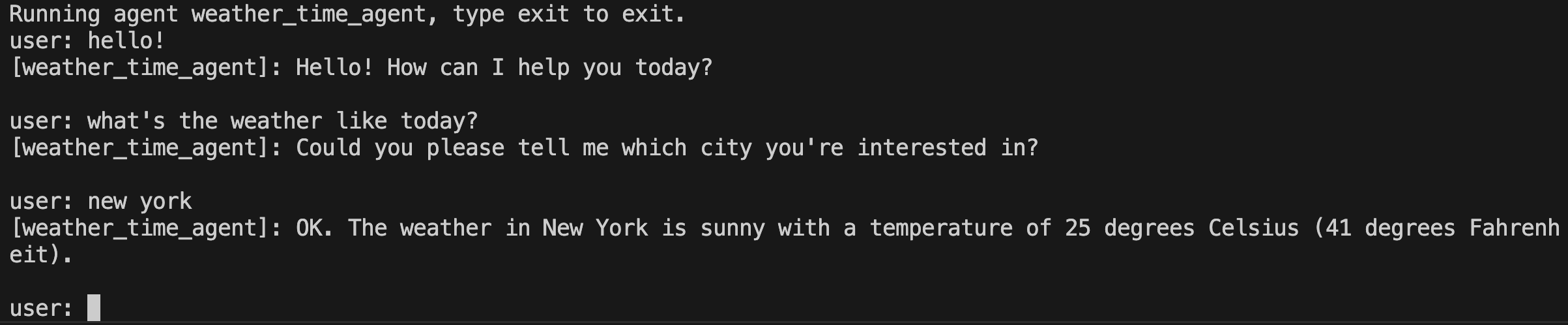
运行智能体
使用以下命令在 ADK 命令行界面中运行你的智能体:
在 Go 中,命令行界面不是一个独立的 adk 工具。相反,你需要将启动器直接嵌入到智能体的 main.go 中。
full.NewLauncher() 辅助函数将控制台、Web 服务器和其他模式打包到单个二进制文件中,当未提供子命令关键字时,默认使用控制台模式:
import (
    "google.golang.org/adk/v2/cmd/launcher"
    "google.golang.org/adk/v2/cmd/launcher/full"
)

func main() {
    // ... 构建你的智能体和配置 ...
    l := full.NewLauncher()
    if err := l.Execute(ctx, config, os.Args[1:]); err != nil {
        log.Fatalf("Run failed: %v\n\n%s", err, l.CommandLineSyntax())
    }
}
使用以下任一命令在控制台模式下运行智能体:
创建一个 AgentCliRunner 类(参见 Java 快速入门)并运行:
这将启动一个交互式会话,你可以在终端中直接输入查询并查看智能体的响应。
会话选项
Python only
--save_session、--resume、--replay 和 --session_id 选项仅在 Python ADK CLI 中可用。Go 的控制台启动器不支持通过命令行标志进行会话保存/恢复/回放。在 Go 中,会话持久化是通过在代码中向 launcher.Config 提供持久化的 session.Service 实现(如 session/database)来配置的。
adk run 命令包含用于保存、恢复和回放会话的选项。
保存会话
要在退出时保存会话:
系统会提示你输入会话 ID,会话将保存到
path/to/my_agent/<session_id>.session.json。
你也可以预先指定会话 ID:
恢复会话
要继续之前保存的会话:
这将加载之前的会话状态和事件历史记录,显示出来,并允许你继续对话。
回放会话
要在没有交互式输入的情况下回放会话文件:
输入文件应包含初始状态和查询:
存储选项
Python only
--session_service_uri 和 --artifact_service_uri 命令行标志仅在 Python ADK CLI 中可用。在 Go 中,会话和制品服务是在构建 launcher.Config 时在代码中配置的——例如,使用 session/database 作为持久化的数据库支持的会话存储,或使用 artifact/gcsartifact 作为 Cloud Storage 支持的制品存储。
| 选项 | 描述 | 默认值 |
|---|---|---|
--session_service_uri |
自定义会话存储 URI | 每个智能体 SQLite 位于 <agents_dir>/<agent>/.adk/session.db |
--artifact_service_uri |
自定义制品存储 URI | 每个智能体目录位于 <agents_dir>/<agent>/.adk/artifacts |
--memory_service_uri |
自定义记忆服务 URI | 内存中 |
存储选项示例
所有选项
要发送单个消息并退出而不是启动交互式会话,请将查询作为参数传递:
| 选项 | 描述 |
|---|---|
--save_session |
退出时将会话保存到 JSON 文件 |
--session_id |
保存时使用的会话 ID |
--resume |
要恢复的已保存会话文件路径 |
--replay |
用于非交互式回放的输入文件路径 |
--session_service_uri |
自定义会话存储 URI |
--artifact_service_uri |
自定义制品存储 URI |
--memory_service_uri |
自定义记忆服务 URI |
--use_local_storage/--no_use_local_storage |
未设置服务 URI 时使用本地 .adk 文件夹 |
--state |
运行的初始状态,JSON 字符串格式 |
--timeout |
单轮或单次查询的超时时间,如 30s 或 5m |
--in_memory |
不持久化会话数据 |
--jsonl |
输出结构化 JSONL 而非人类可读文本 |
--default_llm_model |
智能体未设置模型时使用的默认模型 |
Go 的标志与 Python 不同
Go 的控制台启动器不支持 --save_session、--resume、
--replay、--session_id、--session_service_uri 或
--artifact_service_uri。这些是 Python CLI 的功能。在 Go 中,会话和
制品服务通过 launcher.Config 在代码中配置。
标志在 console 关键字之后传递(如果 console 是默认的,则直接传递):
| 标志 | 描述 | 默认值 |
|---|---|---|
-streaming_mode |
智能体响应的流式模式(none|sse) |
自动检测(TTY → sse,管道 → none) |
-shutdown-timeout |
优雅关闭等待时间 | 2s |
-otel_to_cloud |
将 OpenTelemetry 数据导出到 GCP | false |
例如,要强制非流式输出:
或者强制 SSE 流式输出(逐 token 输出):
使用遥测
ADK CLI 收集匿名使用遥测数据,以了解功能采用情况、指导开发优先级并改进工具性能。默认情况下数据收集是关闭的,直到你明确选择启用。
你的遥测偏好设置存储在本地机器的 ~/.adk/config.json 中。你可以随时通过终端管理遥测数据收集:
- 启用:
adk telemetry enable - 禁用:
adk telemetry disable - 检查状态:
adk telemetry status
你也可以随时通过打开 ~/.adk/config.json 并将 telemetry 属性设置为 false 来手动停用遥测数据收集:
收集的数据
- 环境属性:操作系统信息、运行时语言和版本,以及已安装的 ADK CLI 版本。
- 命令执行事件:通用命令和子命令名称、传递的标志、执行持续时间、退出代码,以及发生错误时的异常类型。我们还会记录一个序列号和一个临时会话 ID,该 ID 在命令执行后会被丢弃。
不收集的数据
CLI 不收集敏感、私密或个人数据,具体包括:
- 传递给命令或标志的参数或参数值,如智能体名称、提示词字符串、文件路径。
- 用户凭据、用户名、API 密钥、OAuth 令牌或密钥。
- Google Cloud 项目 ID 或云账户详情。
- 源代码文件、文件内容或目录路径。
- 个人可识别信息(PII)。