使用工具进行身份验证
你在 ADK 智能体中使用的工具和服务可能需要访问受保护的资源,例如邮件或日历应用中的用户数据,或是数据库中的销售记录。获取这些资源的访问权限通常需要一个身份验证过程,其中包括必须经过仔细管理和保护的凭据和访问密钥。当你本地运行智能体或将其部署到托管服务时,管理身份验证数据的要求也会发生变化。如果具有不同访问权限的多个用户正在与智能体交互,这会增加另一层身份验证管理需求。
警告:凭据存储与安全风险
根据你的会话存储后端、SessionService 实现以及整体应用程序的安全态势,直接在会话状态中存储敏感凭据(如访问令牌,尤其是刷新令牌)可能会带来安全风险。在为一般用途部署 ADK 智能体之前,请仔细考虑如何在大中管理凭据。
身份验证与凭据管理
在 ADK 智能体中管理身份验证和凭据有多种方式。每种方法都带有一定程度的风险,因此你应该仔细考虑哪种方法最适合你的应用程序和客户。
推荐:身份验证管理服务
将你的智能体部署到生产托管环境时,你的智能体正确验证受限工具和服务的能力变得更加具有挑战性,且正确管理也变得更加重要。当你的智能体用户对受限工具和数据具有不同的访问权限时,此身份验证挑战可能变得更加复杂。
与其编写代码来处理智能体使用的各种工具的身份验证流程和凭据管理,不如使用身份验证管理服务来同时为你管理两者。该服务应处理密钥和机密的存储,以及 OAuth 访问令牌或刷新令牌的获取、管理和存储。详细了解 ADK 的智能体身份集成。
自管理身份验证
如果你决定使用 ADK 辅助函数和自己的代码来管理身份验证流程,请考虑以下建议:
- API 密钥和客户端密钥:对于在 ADK 代码中使用的任何 API 密钥和客户端密钥,在本地计算环境上运行时使用排除在版本控制之外的本地
.env文件。当智能体托管或在生产环境中时,使用密钥管理器。有关密钥管理器的更多详细信息,请参阅下一节。 - 交互式身份验证:当使用交互式三向授权 (3LO) OAuth 或 OpenID Connect (OIDC) 对工具进行身份验证时,在客户端应用程序上编写一个服务来获取、管理和刷新令牌。确保将这些令牌存储在加密数据库中的已认证用户标识符下。
密钥管理服务
对于生产环境,如果你不使用身份验证管理服务,则应将凭据存储在专用密钥管理器服务中以保护该数据。通过这种方法,密钥管理器安全地存储智能体访问的任何工具或服务的凭据,这些密钥不会驻留在智能体的运行内存中。例如,使用此方法的自定义 ADK 工具在会话内存中只有短期访问令牌或安全引用,并在需要时从密钥管理器检索长效刷新令牌。选择密钥管理器时,请考虑来自成熟提供商的服务,如 Google Cloud Secret Manager 或其他密钥管理服务。
本地加密密钥存储
对于安全性要求较低的智能体应用程序,将凭据保存在本地加密存储中也是一个可行的选择。考虑使用专用的本地密钥存储系统,或使用稳健的加密库对本地数据库中的数据进行加密,然后使用密钥管理服务安全地管理加密密钥。请务必仅在运行内存中保留短效访问令牌,并仅在需要时从加密的本地存储中访问长效凭据和刷新令牌。
内存中密钥
此方法应仅在你智能体的早期开发和测试期间使用。采用这种方法,凭据将存储在当前的 InMemorySessionService 实例中。数据仅存在于会话内存中,不会被持久化。然而,你应该根据智能体会话可能持续的时间、谁有权访问智能体以及运行智能体的环境安全性,仔细权衡使用此方法的风险。
框架组件
在 ADK 框架内,AuthScheme 和 AuthCredential 是处理身份验证方法和管理凭据数据的关键组件:
-
AuthScheme:定义了 API 期望身份验证凭据的方式,例如 Header 中的 API Key 或 OAuth 2.0 Bearer 令牌。ADK 支持与 OpenAPI 3.0 相同类型的身份验证方案,并为凭据类型使用特定的类,包括 APIKey、HTTPBearer、OAuth2 和 OpenIdConnectWithConfig。有关每种 OpenAPI 凭据类型的更多详情,请参阅 OpenAPI 文档:身份验证。
-
AuthCredential:持有启动身份验证过程所需的初始信息,例如应用程序的 OAuth 客户端 ID 或密钥,或者是 API Key 的值。该类的一个实例包含一个 auth_type(如
API_KEY、OAUTH2、SERVICE_ACCOUNT),用于指定凭据类型。
通用身份验证流程涉及在配置工具时提供这些详细信息。随后 ADK 会尝试在工具进行 API 调用之前自动交换初始凭据(如访问令牌)。对于需要用户交互的流程(包括 OAuth 同意),ADK 会触发一个特定的交互过程,与你的 Agent Client 应用程序进行交互。
支持的初始凭据类型
- API_KEY: 提供简单的键值身份验证,通常不需要身份验证交换。
- HTTP: 提供 Basic Auth(不推荐使用,且可能不支持交换),或已获取的 Bearer 令牌。Bearer 令牌不需要身份验证交换。
- OAUTH2: 提供标准的 OAuth 2.0 身份验证流程,需要配置客户端 ID、密钥和作用域。此方法通常会触发用户同意的交互流程。
- OPEN_ID_CONNECT: 提供基于 OpenID Connect 的身份验证。与 OAuth2 类似,此类型通常需要配置和用户交互。
- SERVICE_ACCOUNT: 提供 Google Cloud 服务账号凭据,以 JSON 密钥或应用默认凭据的形式。此类型通常会交换 Bearer 令牌。
工具与集成快速指南
以下是 ADK 核心工具集身份验证的简要指南:
- RestApiTool:在初始化期间设置
auth_scheme和auth_credential。 - OpenAPIToolset:在初始化期间设置
auth_scheme和auth_credential。 - APIHubToolset:在初始化期间设置
auth_scheme和auth_credential(如果 API 需要身份验证)。 - ApplicationIntegrationToolset:在初始化期间设置
auth_scheme和auth_credential(如果 API 需要身份验证)。 - GoogleApiToolSet:使用此工具集特定的身份验证方法。
有关其他预构建工具和集成的更多身份验证详情,请参阅 ADK 集成目录。
使用经过认证的工具构建智能体应用
你可以在定义工具时设置身份验证:
配置带有身份验证的工具
安全警告
根据你的会话存储后端(SessionService)和整体安全性要求,将敏感凭据(如访问令牌,尤其是刷新令牌)直接存储在会话状态中可能存在风险。
- InMemorySessionService:适用于测试,进程结束即丢失,风险较小。
- 持久化数据库:强烈建议在存入数据库前使用强大的加密库(如 cryptography)对令牌进行加密。
- 安全密钥存储(推荐):在生产环境中,最推荐的做法是将敏感凭据存储在专用密钥管理器中(如 Google Cloud Secret Manager)。你的工具可以只在会话状态中存储短期访问令牌或安全引用。
你可以根据工具集类型(基于 OpenAPI 的工具集或 Google API 工具集)来配置不同的身份验证方式,对于受 Cloud IAM 保护的服务,还需要考虑服务是否需要 ID 令牌而非访问令牌。以下各小节分别介绍了每种情况。
使用基于 OpenAPI 的工具集
在工具集初始化期间传入身份验证方案和凭据。工具集会将其应用到生成的所有工具上。以下是在 ADK 中创建带身份验证工具的几种方式。
旅程 1:使用经过认证的工具构建智能体应用
本节重点介绍如何使用需要身份验证的现成工具(如来自 RestApiTool、OpenAPIToolset 等)。你的主要职责是配置这些工具并处理交互式认证流程的客户端逻辑。
1. 配置带有身份验证的工具
当向智能体添加需要认证的工具时,你需要提供 AuthScheme 和初始 AuthCredential。
A. 使用基于 OpenAPI 的工具集
from google.adk.tools.openapi_tool.auth.auth_helpers import token_to_scheme_credential
from google.adk.tools.openapi_tool.openapi_spec_parser.openapi_toolset import OpenAPIToolset

# 构造 API 密钥方案和凭据
auth_scheme, auth_credential = token_to_scheme_credential(
    "apikey", "header", "X-API-KEY", "你的 API 密钥字符串"
)
sample_api_toolset = OpenAPIToolset(
    spec_str="...", # 规范内容
    auth_scheme=auth_scheme,
    auth_credential=auth_credential,
)
创建一个需要 OAuth2 的工具。
from google.adk.tools.openapi_tool.openapi_spec_parser.openapi_toolset import OpenAPIToolset
from fastapi.openapi.models import OAuth2
from fastapi.openapi.models import OAuthFlowAuthorizationCode
from fastapi.openapi.models import OAuthFlows
from google.adk.auth import AuthCredential
from google.adk.auth import AuthCredentialTypes
from google.adk.auth import OAuth2Auth

auth_scheme = OAuth2(
    flows=OAuthFlows(
        authorizationCode=OAuthFlowAuthorizationCode(
            authorizationUrl="https://accounts.google.com/o/oauth2/auth",
            tokenUrl="https://oauth2.googleapis.com/token",
            scopes={
                "https://www.googleapis.com/auth/calendar": "calendar scope"
            },
        )
    )
)
auth_credential = AuthCredential(
    auth_type=AuthCredentialTypes.OAUTH2,
    oauth2=OAuth2Auth(
        client_id=YOUR_OAUTH_CLIENT_ID,
        client_secret=YOUR_OAUTH_CLIENT_SECRET
    ),
)

calendar_api_toolset = OpenAPIToolset(
    spec_str=google_calendar_openapi_spec_str, # 此处填写 openapi 规范字符串
    spec_str_type='yaml',
    auth_scheme=auth_scheme,
    auth_credential=auth_credential,
)
创建一个需要服务账号的工具。
from google.adk.tools.openapi_tool.auth.auth_helpers import service_account_dict_to_scheme_credential
from google.adk.tools.openapi_tool.openapi_spec_parser.openapi_toolset import OpenAPIToolset

service_account_cred = json.loads(service_account_json_str)
auth_scheme, auth_credential = service_account_dict_to_scheme_credential(
    config=service_account_cred,
    scopes=["https://www.googleapis.com/auth/cloud-platform"],
)
sample_toolset = OpenAPIToolset(
    spec_str=sa_openapi_spec_str, # 此处填写 openapi 规范字符串
    spec_str_type='json',
    auth_scheme=auth_scheme,
    auth_credential=auth_credential,
)
创建一个需要 OpenID connect 的工具。
from google.adk.auth.auth_schemes import OpenIdConnectWithConfig
from google.adk.auth.auth_credential import AuthCredential, AuthCredentialTypes, OAuth2Auth
from google.adk.tools.openapi_tool.openapi_spec_parser.openapi_toolset import OpenAPIToolset

auth_scheme = OpenIdConnectWithConfig(
    authorization_endpoint=OAUTH2_AUTH_ENDPOINT_URL,
    token_endpoint=OAUTH2_TOKEN_ENDPOINT_URL,
    scopes=['openid', 'YOUR_OAUTH_SCOPES']
)
auth_credential = AuthCredential(
    auth_type=AuthCredentialTypes.OPEN_ID_CONNECT,
    oauth2=OAuth2Auth(
        client_id="...",
        client_secret="...",
    )
)

userinfo_toolset = OpenAPIToolset(
    spec_str=content, # 此处填写实际规范
    spec_str_type='yaml',
    auth_scheme=auth_scheme,
    auth_credential=auth_credential,
)
使用 Google API 工具集
这些工具集通常具有专用的配置方法。
提示:有关如何创建 Google OAuth 客户端 ID 和密钥的指南,请参阅此指南:获取你的 Google API 客户端 ID
# 示例:配置 Google Calendar 工具
from google.adk.tools.google_api_tool import CalendarToolset

client_id = "YOUR_GOOGLE_OAUTH_CLIENT_ID.apps.googleusercontent.com"
client_secret = "YOUR_GOOGLE_OAUTH_CLIENT_SECRET"

calendar_toolset = CalendarToolset()

# 使用此工具集类型特定的配置方法
calendar_toolset.configure_auth(
    client_id=client_id, client_secret=client_secret
)

# agent = LlmAgent(..., tools=[calendar_toolset])
使用 ID 令牌
如果你的智能体调用受限服务,例如私有的 Cloud Run 或 Cloud Function,智能体需要证明你的身份,而不仅仅是你的权限。如果你调用的是通过 Cloud IAM 访问的服务,则应使用 ID 令牌。
-
访问令牌(默认):用于调用 Google API(Drive、BigQuery)。可以将其理解为你的门禁卡。
-
ID 令牌:用于调用通过 IAM 保护的你自己的服务。可以将其理解为你的护照。
配置
要实现 ID 令牌身份验证,请按以下参数配置你的 ServiceAccount,确保将目标服务的 URL 指定为 audience。
from google.adk.auth.auth_credential import ServiceAccount
from google.adk.tools.openapi_tool.auth.auth_helpers import service_account_scheme_credential
from google.adk.tools.openapi_tool.openapi_spec_parser.openapi_toolset import OpenAPIToolset

# 配置 ServiceAccount 使用 ID 令牌身份验证。
# 将 <YOUR_AUDIENCE_URL> 替换为你调用的服务的 URL。
sa_config = ServiceAccount(
    use_default_credential=True,
    use_id_token=True,
    audience="<YOUR_AUDIENCE_URL>",
)

auth_scheme, auth_credential = service_account_scheme_credential(sa_config)

sample_toolset = OpenAPIToolset(
    spec_str=sa_openapi_spec_str, # 此处填写 OpenAPI 规范
    spec_str_type="json",
    auth_scheme=auth_scheme,
    auth_credential=auth_credential,
)
身份验证故障排查
如果你收到身份验证错误,请确认你的服务账号在目标服务上拥有 'Cloud Run Invoker' 或等效角色。
关键要点
-
Audience 要求:
audience是一项安全特性,用于将令牌绑定到特定目标,防止令牌被"重放"到其他服务。 -
无自动刷新:与用户的 OAuth2 访问令牌不同,服务账号 ID 令牌在请求时获取。它们不会在后台定时器上自动刷新。
-
流程概述:你定义意图,ADK 处理握手流程、从 Google 认证服务器获取令牌,并将其注入到你的出站 HTTP 请求头中。
ServiceAccount 配置参数
-
service_account_credential(可选):提供你的服务账号 JSON 密钥文件的路径或字典。如果你在本地或 Google Cloud 外部运行,请使用此参数。 -
use_default_credential(可选):设置为 True 以使用应用默认凭据 (ADC)。如果你的智能体已在 Google Cloud 内部运行,例如在 Cloud Run 或 Cloud Functions 上,推荐使用此参数,因为它无需本地密钥文件。 -
use_id_token(IAM 必需):设置为 True 以启用基于 ID 令牌的身份验证。这会将 ADK 从请求用于 Google API 的访问令牌切换为请求用于你自己 IAM 保护服务的 ID 令牌。 -
audience(当 use_id_token=True 时必需):你调用的服务的 URL,例如https://my-service.run.app。这是一个安全绑定,确保令牌仅对特定目标有效。 -
scopes(可选):仅在请求 Google Cloud API(如 Drive 或 BigQuery)的访问令牌时使用。如果你使用 ID 令牌进行私有服务身份验证,则无需设置此项。
将 use_id_token 与 audience 配合使用
始终将 use_id_token=True 和 audience 一起使用。如果只提供其中一个,ADK 将抛出错误以防止意外的错误配置。
使用外部访问令牌
external_access_token_key 功能允许你的智能体使用运行时环境提供的现有访问令牌(例如前端应用提供的令牌),而不是启动新的身份验证流程。配置后,凭据管理器会跳过标准的 OAuth 流程,转而检索智能体 tool_context.state 中的密钥,并直接使用该令牌进行身份验证。此配置参数的使用是互斥的,不能在同一配置块中包含 credentials、client_id、client_secret 或 scopes 参数。
在你正在使用的工具集的凭据配置上设置该键。以下示例使用 BigQuery:
from google.adk.integrations.bigquery import BigQueryCredentialsConfig

# 配置工具集在会话状态中查找 "my_frontend_token"
credentials_config = BigQueryCredentialsConfig(
    # 请勿在生产代码中硬编码身份验证密钥
    external_access_token_key="my_frontend_token"
)
身份验证请求流程
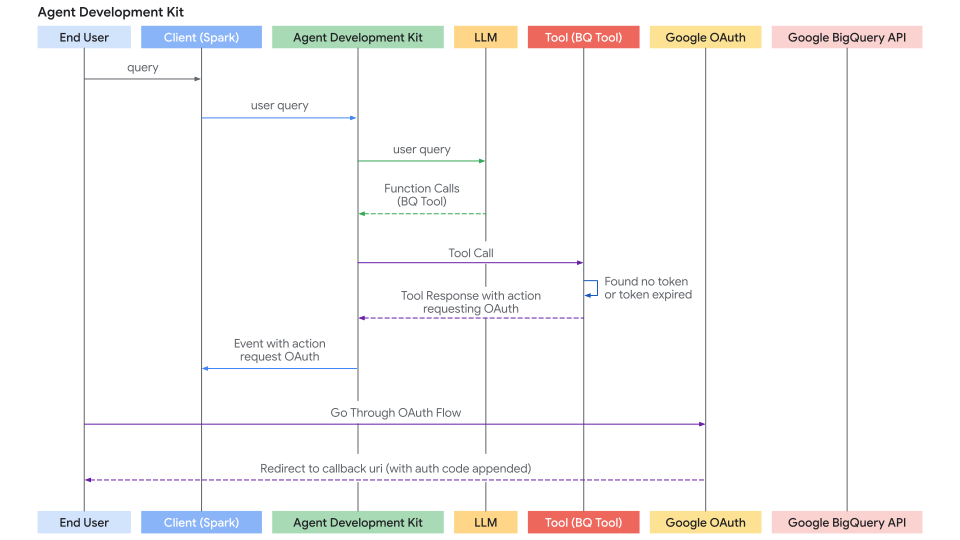
此图展示了端到端的身份验证握手过程,从初始用户查询到 ADK 捕获凭据请求、处理重定向流程以及在获得授权后重试工具调用的完整路径。
在工具集级别进行身份验证
你无需逐个对工具进行身份验证,而可以在工具集(Toolset)级别一次性对一整套工具进行身份验证。
在底层,BaseLlmFlow 会在列出或执行任何工具之前自动检查你的 BaseToolset 是否有身份验证要求;它通过检查工具集的 get_auth_config() 方法来实现这一点。
如果你的工具集返回一个 AuthConfig 对象,且会话中尚不存在所需的凭据,ADK 框架将执行以下步骤:
- 暂停执行: 安全地暂停当前流程。
- 请求凭据: 向客户端发出一个
adk_request_credential事件,类似于处理交互式 OAuth/OIDC 流程中详述的交互式流程。
这种方式为你提供了一个集中统一的位置,用于为一组相关工具定义身份验证要求。框架会处理整个身份验证流程,确保在你的智能体访问工具集中的工具之前解析出所需的凭据。
如何启用
要进行此设置,请在你自定义的 BaseToolset 子类中重写 get_auth_config() 方法:
from google.adk.auth import AuthConfig
from google.adk.tools.base_toolset import BaseToolset


class MyAuthenticatedToolset(BaseToolset):
  async def get_tools(
      self, readonly_context: Optional[ReadonlyContext] = None
  ) -> list[BaseTool]:
    # ADK 会在调用此方法之前,先通过 get_auth_config() 解析凭据,
    # 因此你在这里返回的工具可以依赖该凭据。
    return []  # 替换为你工具集中的工具。

    return AuthConfig(
        auth_scheme=auth_scheme,
        raw_auth_credential=auth_credential,
    )
处理交互式 OAuth/OIDC 流程(客户端)
如果工具需要用户登录/同意(通常是 OAuth 2.0 或 OIDC),ADK 框架会暂停执行并向你的智能体客户端应用程序发出信号。存在两种情况:
- 智能体客户端应用程序在同一进程中直接运行智能体(通过
runner.run_async)。例如 UI 后端、CLI 应用或 Spark 作业等。 - 智能体客户端应用程序通过
/run或/run_sse端点与 ADK 的 fastapi 服务器交互。ADK 的 fastapi 服务器可以设置在与智能体客户端应用程序相同或不同的服务器上。
第二种情况是第一种情况的特殊情况,因为 /run 或 /run_sse 端点也会调用 runner.run_async。唯一的区别是:
- 是调用 Python 函数来运行智能体(第一种情况)还是调用服务端点来运行智能体(第二种情况)。
- 结果事件是内存中的对象(第一种情况)还是 HTTP 响应中的序列化 JSON 字符串(第二种情况)。
以下部分重点关注第一种情况,你应该能够非常直接地将其映射到第二种情况。如有必要,我们还将描述第二种情况需要处理的一些差异。
以下是你的客户端应用程序的逐步过程:
步骤 1:运行智能体并检测身份验证请求 {: #run-agent-and-detect-auth-request }
- 使用
runner.run_async启动智能体交互。 - 遍历产生的事件。
- 寻找一个特定的函数调用事件,其函数调用具有特殊名称:
adk_request_credential。此事件表示需要用户交互。你可以使用辅助函数来识别此事件并提取必要的信息。(对于第二种情况,逻辑类似。你从 HTTP 响应中反序列化事件)。
# runner = Runner(...)
# session = await session_service.create_session(...)
# content = types.Content(...) # 用户的初始查询

print("\n运行智能体...")
events_async = runner.run_async(
    session_id=session.id, user_id='user', new_message=content
)

auth_request_function_call_id, auth_config = None, None

async for event in events_async:
    # 使用辅助函数检查是否为特定的身份验证请求事件
    if (auth_request_function_call := get_auth_request_function_call(event)):
        print("--> 智能体需要身份验证。")
        # 保存后续响应所需的 ID
        if not (auth_request_function_call_id := auth_request_function_call.id):
            raise ValueError(f'无法从函数调用中获取 function call id: {auth_request_function_call}')
        # 获取包含 auth_uri 等的 AuthConfig
        auth_config = get_auth_config(auth_request_function_call)
        break # 暂停处理事件,等待用户交互

if not auth_request_function_call_id:
    print("\n不需要身份验证或智能体已完成。")
    # return # 或处理已收到的最终响应
辅助函数 helpers.py:
from google.adk.events import Event
from google.adk.auth import AuthConfig # 导入必要类型
from google.genai import types

def get_auth_request_function_call(event: Event) -> types.FunctionCall:
    # 从事件中获取特殊的身份验证请求函数调用
    if not event.content or not event.content.parts:
        return
    for part in event.content.parts:
        if (
            part
            and part.function_call
            and part.function_call.name == 'adk_request_credential'
            and event.long_running_tool_ids
            and part.function_call.id in event.long_running_tool_ids
        ):

            return part.function_call

def get_auth_config(auth_request_function_call: types.FunctionCall) -> AuthConfig:
    # 从身份验证请求函数调用的参数中提取 AuthConfig 对象
    if not auth_request_function_call.args or not (auth_config := auth_request_function_call.args.get('authConfig')):
        raise ValueError(f'无法从函数调用中获取身份验证配置:{auth_request_function_call}')
    if isinstance(auth_config, dict):
        auth_config = AuthConfig.model_validate(auth_config)
    elif not isinstance(auth_config, AuthConfig):
        raise ValueError(f'无法获取身份验证配置 {auth_config} 不是 AuthConfig 的实例。')
    return auth_config
步骤 2:重定向用户进行授权 {: #redirect-user-for-authorization }
- 从上一步提取的
auth_config中获取授权 URL (auth_uri)。 - 重要的是,将你的应用程序 redirect_uri 作为查询参数附加到此
auth_uri。此redirect_uri必须在你的 OAuth 提供商处预注册(例如,Google Cloud Console,Okta 管理面板)。 - 将用户重定向到此完整 URL(例如,在他们的浏览器中打开它)。
# (在检测到需要身份验证后继续)

if auth_request_function_call_id and auth_config:
    # 从 AuthConfig 获取基础授权 URL
    base_auth_uri = auth_config.exchanged_auth_credential.oauth2.auth_uri

    if base_auth_uri:
        redirect_uri = 'http://localhost:8000/callback' # 必须与你的 OAuth 客户端应用配置一致
        # 添加 redirect_uri(生产环境请用 urlencode)
        auth_request_uri = base_auth_uri + f'&redirect_uri={redirect_uri}'
        # 现在你需要将终端用户重定向到此 auth_request_uri,或让他们在浏览器中打开
        # 该 auth_request_uri 应由对应的认证提供方服务,终端用户登录并授权你的应用访问其数据
        # 然后认证提供方会将终端用户重定向到你提供的 redirect_uri
        # 下一步:从用户(或你的 Web 服务器处理器)获取此回调 URL
    else:
         print("错误:在 auth_config 中未找到授权 URI。")
         # 处理错误
步骤 3:处理重定向回调(客户端)
用户完成授权后,认证提供商会将用户重定向回你的 redirect_uri,并携带授权码 (code)。你的应用需要捕获包含该代码的完整回调 URL。
- 你的应用程序必须有一个机制(例如,
redirect_uri处的 Web 服务器路由)来在用户使用提供商授权应用程序后接收用户。 - 提供商将用户重定向到你的
redirect_uri并在 URL 中附加authorization_code(以及可能的state、scope)作为查询参数。 - 从这个传入请求中捕获完整回调 URL。
- (此步骤发生在主智能体执行循环之外,在你的 Web 服务器或等效的回调处理器中。)
步骤 4:将身份验证结果发送回 ADK(客户端)
- 一旦你有了完整回调 URL(包含授权代码),检索在客户端步骤 1 中保存的
auth_request_function_call_id和auth_config对象。 - 将捕获的回调 URL 设置到
exchanged_auth_credential.oauth2.auth_response_uri字段中。还要确保exchanged_auth_credential.oauth2.redirect_uri包含你使用的重定向 URI。 - 创建一个包含
types.Part的types.Content对象,其中包含types.FunctionResponse。- 将
name设置为"adk_request_credential"。(注意:这是 ADK 继续进行身份验证的特殊名称。不要使用其他名称。) - 将
id设置为你保存的auth_request_function_call_id。 - 将
response设置为序列化(例如,.model_dump())的更新AuthConfig对象。
- 将
- 对同一会话再次调用
runner.run_async,将此FunctionResponse内容作为new_message传递。
# (用户交互后继续)

    # 模拟获取回调 URL(例如,从用户粘贴或 Web 处理程序)
    auth_response_uri = await get_user_input(
        f'在此处粘贴完整的回调 URL:\n> '
    )
    auth_response_uri = auth_response_uri.strip() # 清理输入

    if not auth_response_uri:
        print("未提供回调 URL。中止。")
        return

    # 使用回调详细信息更新收到的 AuthConfig
    auth_config.exchanged_auth_credential.oauth2.auth_response_uri = auth_response_uri
    # 也包括使用的 redirect_uri,因为令牌交换可能需要它
    auth_config.exchanged_auth_credential.oauth2.redirect_uri = redirect_uri

    # 构造 FunctionResponse Content 对象
    auth_content = types.Content(
        role='user', # 发送 FunctionResponse 时角色可以是 'user'
        parts=[
            types.Part(
                function_response=types.FunctionResponse(
                    id=auth_request_function_call_id,       # 关联原始请求
                    name='adk_request_credential', # 框架专用函数名
                    response=auth_config.model_dump() # 返回*更新后的* AuthConfig
                )
            )
        ],
    )

    # --- 恢复执行 ---
    print("\n将身份验证详细信息提交回智能体...")
    events_async_after_auth = runner.run_async(
        session_id=session.id,
        user_id='user',
        new_message=auth_content, # 发送回 FunctionResponse
    )

    # --- 处理智能体最终输出 ---
    print("\n--- 身份验证后的智能体响应 ---")
    async for event in events_async_after_auth:
        # 正常处理事件,期望工具调用现在成功
        print(event) # 打印完整事件以供检查
注意:使用 Resume 功能的身份验证响应
如果你的 ADK 智能体工作流配置了 Resume 功能,你还必须在授权响应中包含调用 ID(invocation_id)参数。你提供的调用 ID 必须与生成授权请求的调用相同,否则系统会使用授权响应启动新的调用。如果你的智能体使用 Resume 功能,请考虑在授权请求中将调用 ID 作为参数包含进来,以便它可以包含在授权响应中。有关使用 Resume 功能的更多详细信息,请参阅恢复停止的智能体。
步骤 5:ADK 处理令牌交换和工具重试并获取工具结果 {: #adk-handles-token-exchange-and-gets-tool-result }
- ADK 接收
adk_request_credential的FunctionResponse。 - 它使用更新后的
AuthConfig中的信息(包含包含代码的回调 URL)与提供方的令牌端点执行 OAuth 令牌交换,获取访问令牌(可能还有刷新令牌)。 - ADK 通过在会话状态中设置这些令牌,在内部使其可用。
- ADK 自动重试原始工具调用(最初因缺少身份验证而失败的那个)。
- 这次,工具通过
tool_context.get_auth_response()找到有效令牌并成功执行已认证的 API 调用。 - 智能体从工具接收实际结果并生成对用户的最终响应。
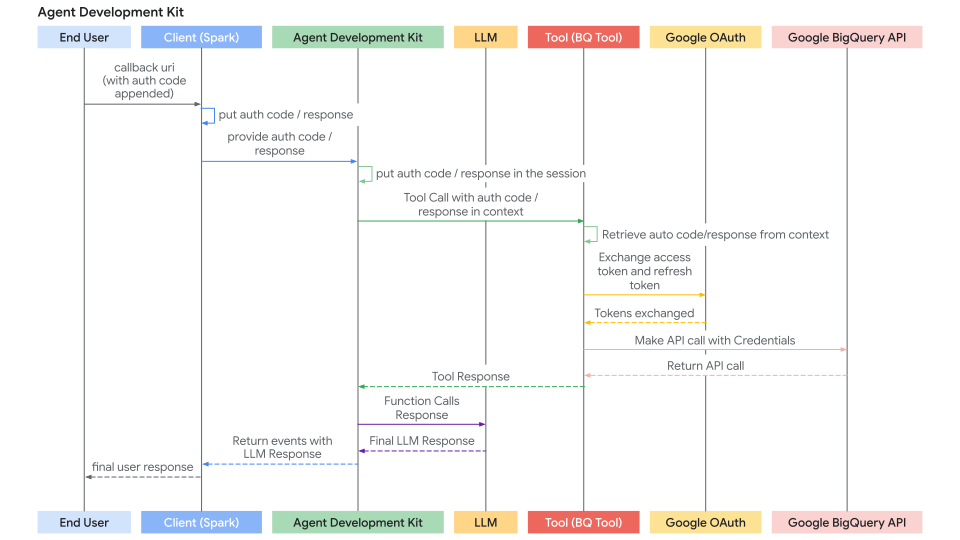
Agent Client 发送回授权响应且 ADK 重试工具的身份验证响应流程序列图如下所示:
构建需要身份验证的自定义工具(FunctionTool)
本节重点介绍在创建新的 ADK 工具时在自定义 Python 函数内部实现身份验证逻辑。我们将实现一个 FunctionTool 作为示例。
先决条件
你的函数签名必须包含 tool_context: ToolContext。ADK 自动注入此对象,提供对状态和身份验证机制的访问。
from google.adk.tools import FunctionTool, ToolContext
from typing import Dict

def my_authenticated_tool_function(param1: str, ..., tool_context: ToolContext) -> dict:
    # ... 你的逻辑 ...
    pass

my_tool = FunctionTool(func=my_authenticated_tool_function)
工具函数内的身份验证逻辑
在你的函数内实施以下步骤:
步骤 1:检查缓存和有效凭据
在你的工具函数内,首先检查是否已经在此会话的之前运行中存储了有效的凭据(例如,访问/刷新令牌)。当前会话的凭据应存储在 tool_context.invocation_context.session.state(状态字典)中。通过检查 tool_context.invocation_context.session.state.get(credential_name, None) 来检查现有凭据的存在。
from google.oauth2.credentials import Credentials
from google.auth.transport.requests import Request

# 在你的工具函数内
TOKEN_CACHE_KEY = "my_tool_tokens" # 选择一个唯一的键
SCOPES = ["scope1", "scope2"] # 定义所需的作用域

creds = None
cached_token_info = tool_context.state.get(TOKEN_CACHE_KEY)
if cached_token_info:
    try:
        creds = Credentials.from_authorized_user_info(cached_token_info, SCOPES)
        if not creds.valid and creds.expired and creds.refresh_token:
            creds.refresh(Request())
            tool_context.state[TOKEN_CACHE_KEY] = json.loads(creds.to_json()) # 更新缓存
        elif not creds.valid:
            creds = None # 无效,需要重新认证
            tool_context.state[TOKEN_CACHE_KEY] = None
    except Exception as e:
        print(f"加载/刷新缓存凭据时出错:{e}")
        creds = None
        tool_context.state[TOKEN_CACHE_KEY] = None

if creds and creds.valid:
    # 跳到步骤 5:进行经过身份验证的 API 调用
    pass
else:
    # 继续步骤 2...
    pass
步骤 2:检查来自客户端的身份验证响应 {: #check-auth-response-from-client }
- 如果步骤 1 没有产生有效凭据,通过调用
exchanged_credential = tool_context.get_auth_response()检查客户端是否刚刚完成了交互流程。 - 这会返回客户端发送回来的更新
exchanged_credential对象(在auth_response_uri中包含回调 URL)。
# 使用工具中配置的 auth_scheme 和 auth_credential。
# exchanged_credential: AuthCredential | None

exchanged_credential = tool_context.get_auth_response(AuthConfig(
  auth_scheme=auth_scheme,
  raw_auth_credential=auth_credential,
))
# 如果 exchanged_credential 不为 None,则表示身份验证响应中已有已交换的凭据。
if exchanged_credential:
   # ADK 已经为我们交换了访问令牌
        access_token = exchanged_credential.oauth2.access_token
        refresh_token = exchanged_credential.oauth2.refresh_token
        creds = Credentials(
            token=access_token,
            refresh_token=refresh_token,
            token_uri=auth_scheme.flows.authorizationCode.tokenUrl,
            client_id=auth_credential.oauth2.client_id,
            client_secret=auth_credential.oauth2.client_secret,
            scopes=list(auth_scheme.flows.authorizationCode.scopes.keys()),
        )
    # 将令牌缓存在会话状态中并调用 API,跳到步骤 5
步骤 3:发起身份验证请求 {: #initiate-auth-request }
如果没有找到有效的凭据(步骤 1)和身份验证响应(步骤 2),工具需要启动 OAuth 流程。定义 AuthScheme 和初始 AuthCredential 并调用 tool_context.request_credential()。返回表示需要授权的响应。
# 使用在工具中配置的 auth_scheme 和 auth_credential。

  tool_context.request_credential(AuthConfig(
    auth_scheme=auth_scheme,
    raw_auth_credential=auth_credential,
  ))
  return {'pending': true, 'message': '等待用户身份验证。'}

# 通过设置 request_credential,ADK 检测到一个待处理的身份验证事件。它会暂停执行并要求最终用户登录。
步骤 4:将授权码交换为令牌 {: #exchange-auth-code-for-token }
ADK 会自动生成 OAuth 授权 URL 并将其呈现给你的智能体客户端应用程序。你的智能体客户端应用程序应按照使用经过认证的工具构建智能体应用中描述的方式,将用户重定向到授权 URL(附加 redirect_uri)。用户完成登录流程后,ADK 会从智能体客户端应用程序中提取身份验证回调 URL,自动解析授权码并生成认证令牌。在下一次工具调用时,步骤 2 中的 tool_context.get_auth_response 将包含一个可用于后续 API 调用的有效凭据。
步骤 5:缓存获得的凭据 {: #cache-obtained-credentials }
在从 ADK 成功获取令牌(步骤 2)或如果令牌仍然有效(步骤 1)后,使用你的缓存键立即存储新的 Credentials 对象到 tool_context.state(序列化,例如,作为 JSON)。
# 在你的工具函数内,在获取 'creds'(无论是刷新的还是新交换的)之后
# 缓存新的/刷新的令牌
tool_context.state[TOKEN_CACHE_KEY] = json.loads(creds.to_json())
print(f"调试:在键下缓存/更新令牌:{TOKEN_CACHE_KEY}")
# 继续步骤 6(进行 API 调用)
步骤 6:进行经过身份验证的 API 调用 {: #make-authenticated-api-call }
- 一旦你有了有效的
Credentials对象(步骤 1 或步骤 4 中的creds),使用它通过适当的客户端库(例如,googleapiclient、requests)对受保护的 API 进行实际调用。传递credentials=creds参数。 - 包含错误处理,特别是对于
HttpError401/403,这可能意味着令牌在调用之间过期或被撤销。如果你得到这样的错误,考虑清除缓存的令牌(tool_context.state.pop(...))并可能再次返回auth_required状态以强制重新身份验证。
# 在你的工具函数内,使用有效的 'creds' 对象
# 确保 creds 在继续之前是有效的
if not creds or not creds.valid:
   return {"status": "error", "error_message": "没有有效的凭据无法继续。"}

try:
   service = build("calendar", "v3", credentials=creds) # 示例
   api_result = service.events().list(...).execute()
   # 继续步骤 7
except Exception as e:
   # 处理 API 错误(例如,检查 401/403,可能清除缓存并重新请求认证)
   print(f"错误:API 调用失败:{e}")
   return {"status": "error", "error_message": f"API 调用失败:{e}"}
步骤 7:返回工具结果 {: #return-tool-results }
- 成功的 API 调用后,将结果处理成对 LLM 有用的字典格式。
- 重要的是,连同数据一起包含一个状态字段。
# 在你的工具函数内,成功 API 调用后
    processed_result = [...] # 为 LLM 处理 api_result
    return {"status": "success", "data": processed_result}
完整代码
# Copyright 2026 Google LLC
#
# Licensed under the Apache License, Version 2.0 (the "License");
# you may not use this file except in compliance with the License.
# You may obtain a copy of the License at
#
#     http://www.apache.org/licenses/LICENSE-2.0
#
# Unless required by applicable law or agreed to in writing, software
# distributed under the License is distributed on an "AS IS" BASIS,
# WITHOUT WARRANTIES OR CONDITIONS OF ANY KIND, either express or implied.
# See the License for the specific language governing permissions and
# limitations under the License.

import os

from google.adk.auth.auth_schemes import OpenIdConnectWithConfig
from google.adk.auth.auth_credential import AuthCredential, AuthCredentialTypes, OAuth2Auth
from google.adk.tools.openapi_tool.openapi_spec_parser.openapi_toolset import OpenAPIToolset
from google.adk.agents.llm_agent import LlmAgent

# --- Authentication Configuration ---
# This section configures how the agent will handle authentication using OpenID Connect (OIDC),
# often layered on top of OAuth 2.0.

# Define the Authentication Scheme using OpenID Connect.
# This object tells the ADK *how* to perform the OIDC/OAuth2 flow.
# It requires details specific to your Identity Provider (IDP), like Google OAuth, Okta, Auth0, etc.
# Note: Replace the example Okta URLs and credentials with your actual IDP details.
# All following fields are required, and available from your IDP.
auth_scheme = OpenIdConnectWithConfig(
    # The URL of the IDP's authorization endpoint where the user is redirected to log in.
    authorization_endpoint="https://your-endpoint.okta.com/oauth2/v1/authorize",
    # The URL of the IDP's token endpoint where the authorization code is exchanged for tokens.
    token_endpoint="https://your-token-endpoint.okta.com/oauth2/v1/token",
    # The scopes (permissions) your application requests from the IDP.
    # 'openid' is standard for OIDC. 'profile' and 'email' request user profile info.
    scopes=['openid', 'profile', "email"]
)

# Define the Authentication Credentials for your specific application.
# This object holds the client identifier and secret that your application uses
# to identify itself to the IDP during the OAuth2 flow.
# !! SECURITY WARNING: Avoid hardcoding secrets in production code. !!
# !! Use environment variables or a secret management system instead. !!
auth_credential = AuthCredential(
  auth_type=AuthCredentialTypes.OPEN_ID_CONNECT,
  oauth2=OAuth2Auth(
    client_id="CLIENT_ID",
    client_secret="CLIENT_SECRET",
  )
)


# --- Toolset Configuration from OpenAPI Specification ---
# This section defines a sample set of tools the agent can use, configured with Authentication
# from steps above.
# This sample set of tools use endpoints protected by Okta and requires an OpenID Connect flow
# to acquire end user credentials.
with open(os.path.join(os.path.dirname(__file__), 'spec.yaml'), 'r') as f:
    spec_content = f.read()

userinfo_toolset = OpenAPIToolset(
   spec_str=spec_content,
   spec_str_type='yaml',
   # ** Crucially, associate the authentication scheme and credentials with these tools. **
   # This tells the ADK that the tools require the defined OIDC/OAuth2 flow.
   auth_scheme=auth_scheme,
   auth_credential=auth_credential,
)

# --- Agent Configuration ---
# Configure and create the main LLM Agent.
root_agent = LlmAgent(
    model='gemini-2.0-flash',
    name='enterprise_assistant',
    instruction='Help user integrate with multiple enterprise systems, including retrieving user information which may require authentication.',
    tools=[userinfo_toolset],
)

# --- Ready for Use ---
# The `root_agent` is now configured with tools protected by OIDC/OAuth2 authentication.
# When the agent attempts to use one of these tools, the ADK framework will automatically
# trigger the authentication flow defined by `auth_scheme` and `auth_credential`
# if valid credentials are not already available in the session.
# The subsequent interaction flow would guide the user through the login process and handle
# token exchanging, and automatically attach the exchanged token to the endpoint defined in
# the tool.
# Copyright 2026 Google LLC
#
# Licensed under the Apache License, Version 2.0 (the "License");
# you may not use this file except in compliance with the License.
# You may obtain a copy of the License at
#
#     http://www.apache.org/licenses/LICENSE-2.0
#
# Unless required by applicable law or agreed to in writing, software
# distributed under the License is distributed on an "AS IS" BASIS,
# WITHOUT WARRANTIES OR CONDITIONS OF ANY KIND, either express or implied.
# See the License for the specific language governing permissions and
# limitations under the License.

import asyncio
from dotenv import load_dotenv
from google.adk.artifacts.in_memory_artifact_service import InMemoryArtifactService
from google.adk.runners import Runner
from google.adk.sessions import InMemorySessionService
from google.genai import types

from .helpers import is_pending_auth_event, get_function_call_id, get_function_call_auth_config, get_user_input
from .tools_and_agent import root_agent

load_dotenv()

agent = root_agent

async def async_main():
  """
  Main asynchronous function orchestrating the agent interaction and authentication flow.
  """
  # --- Step 1: Service Initialization ---
  # Use in-memory services for session and artifact storage (suitable for demos/testing).
  session_service = InMemorySessionService()
  artifacts_service = InMemoryArtifactService()

  # Create a new user session to maintain conversation state.
  session = await session_service.create_session(
      state={},  # Optional state dictionary for session-specific data
      app_name='my_app', # Application identifier
      user_id='user' # User identifier
  )

  # --- Step 2: Initial User Query ---
  # Define the user's initial request.
  query = 'Show me my user info'
  print(f"user: {query}")

  # Format the query into the Content structure expected by the ADK Runner.
  content = types.Content(role='user', parts=[types.Part(text=query)])

  # Initialize the ADK Runner
  runner = Runner(
      app_name='my_app',
      agent=agent,
      artifact_service=artifacts_service,
      session_service=session_service,
  )

  # --- Step 3: Send Query and Handle Potential Auth Request ---
  print("\nRunning agent with initial query...")
  events_async = runner.run_async(
      session_id=session.id, user_id='user', new_message=content
  )

  # Variables to store details if an authentication request occurs.
  auth_request_event_id, auth_config = None, None

  # Iterate through the events generated by the first run.
  async for event in events_async:
    # Check if this event is the specific 'adk_request_credential' function call.
    if is_pending_auth_event(event):
      print("--> Authentication required by agent.")
      auth_request_event_id = get_function_call_id(event)
      auth_config = get_function_call_auth_config(event)
      # Once the auth request is found and processed, exit this loop.
      # We need to pause execution here to get user input for authentication.
      break


  # If no authentication request was detected after processing all events, exit.
  if not auth_request_event_id or not auth_config:
      print("\nAuthentication not required for this query or processing finished.")
      return # Exit the main function

  # --- Step 4: Manual Authentication Step (Simulated OAuth 2.0 Flow) ---
  # This section simulates the user interaction part of an OAuth 2.0 flow.
  # In a real web application, this would involve browser redirects.

  # Define the Redirect URI. This *must* match one of the URIs registered
  # with the OAuth provider for your application. The provider sends the user
  # back here after they approve the request.
  redirect_uri = 'http://localhost:8000/dev-ui' # Example for local development

  # Construct the Authorization URL that the user must visit.
  # This typically includes the provider's authorization endpoint URL,
  # client ID, requested scopes, response type (e.g., 'code'), and the redirect URI.
  # Here, we retrieve the base authorization URI from the AuthConfig provided by ADK
  # and append the redirect_uri.
  # NOTE: A robust implementation would use urlencode and potentially add state, scope, etc.
  auth_request_uri = (
      auth_config.exchanged_auth_credential.oauth2.auth_uri
      + f'&redirect_uri={redirect_uri}' # Simple concatenation; ensure correct query param format
  )

  print("\n--- User Action Required ---")
  # Prompt the user to visit the authorization URL, log in, grant permissions,
  # and then paste the *full* URL they are redirected back to (which contains the auth code).
  auth_response_uri = await get_user_input(
      f'1. Please open this URL in your browser to log in:\n   {auth_request_uri}\n\n'
      f'2. After successful login and authorization, your browser will be redirected.\n'
      f'   Copy the *entire* URL from the browser\'s address bar.\n\n'
      f'3. Paste the copied URL here and press Enter:\n\n> '
  )

  # --- Step 5: Prepare Authentication Response for the Agent ---
  # Update the AuthConfig object with the information gathered from the user.
  # The ADK framework needs the full response URI (containing the code)
  # and the original redirect URI to complete the OAuth token exchange process internally.
  auth_config.exchanged_auth_credential.oauth2.auth_response_uri = auth_response_uri
  auth_config.exchanged_auth_credential.oauth2.redirect_uri = redirect_uri

  # Construct a FunctionResponse Content object to send back to the agent/runner.
  # This response explicitly targets the 'adk_request_credential' function call
  # identified earlier by its ID.
  auth_content = types.Content(
      role='user',
      parts=[
          types.Part(
              function_response=types.FunctionResponse(
                  # Crucially, link this response to the original request using the saved ID.
                  id=auth_request_event_id,
                  # The special name of the function call we are responding to.
                  name='adk_request_credential',
                  # The payload containing all necessary authentication details.
                  response=auth_config.model_dump(),
              )
          )
      ],
  )

  # --- Step 6: Resume Execution with Authentication ---
  print("\nSubmitting authentication details back to the agent...")
  # Run the agent again, this time providing the `auth_content` (FunctionResponse).
  # The ADK Runner intercepts this, processes the 'adk_request_credential' response
  # (performs token exchange, stores credentials), and then allows the agent
  # to retry the original tool call that required authentication, now succeeding with
  # a valid access token embedded.
  events_async = runner.run_async(
      session_id=session.id,
      user_id='user',
      new_message=auth_content, # Provide the prepared auth response
  )

  # Process and print the final events from the agent after authentication is complete.
  # This stream now contain the actual result from the tool (e.g., the user info).
  print("\n--- Agent Response after Authentication ---")
  async for event in events_async:
    print(event)


if __name__ == '__main__':
  asyncio.run(async_main())
# Copyright 2025 Google LLC
#
# Licensed under the Apache License, Version 2.0 (the "License");
# you may not use this file except in compliance with the License.
# You may obtain a copy of the License at
#
#     http://www.apache.org/licenses/LICENSE-2.0
#
# Unless required by applicable law or agreed to in writing, software
# distributed under the License is distributed on an "AS IS" BASIS,
# WITHOUT WARRANTIES OR CONDITIONS OF ANY KIND, either express or implied.
# See the License for the specific language governing permissions and
# limitations under the License.

from google.adk.auth import AuthConfig
from google.adk.events import Event
import asyncio

# --- Helper Functions ---
async def get_user_input(prompt: str) -> str:
  """
  Asynchronously prompts the user for input in the console.

  Uses asyncio's event loop and run_in_executor to avoid blocking the main
  asynchronous execution thread while waiting for synchronous `input()`.

  Args:
    prompt: The message to display to the user.

  Returns:
    The string entered by the user.
  """
  loop = asyncio.get_event_loop()
  # Run the blocking `input()` function in a separate thread managed by the executor.
  return await loop.run_in_executor(None, input, prompt)


def is_pending_auth_event(event: Event) -> bool:
  """
  Checks if an ADK Event represents a request for user authentication credentials.

  The ADK framework emits a specific function call ('adk_request_credential')
  when a tool requires authentication that hasn't been previously satisfied.

  Args:
    event: The ADK Event object to inspect.

  Returns:
    True if the event is an 'adk_request_credential' function call, False otherwise.
  """
  # Safely checks nested attributes to avoid errors if event structure is incomplete.
  return (
      event.content
      and event.content.parts
      and event.content.parts[0] # Assuming the function call is in the first part
      and event.content.parts[0].function_call
      # The specific function name indicating an auth request from the ADK framework.
      and event.content.parts[0].function_call.name == 'adk_request_credential'
  )


def get_function_call_id(event: Event) -> str:
  """
  Extracts the unique ID of the function call from an ADK Event.

  This ID is crucial for correlating a function *response* back to the specific
  function *call* that the agent initiated to request for auth credentials.

  Args:
    event: The ADK Event object containing the function call.

  Returns:
    The unique identifier string of the function call.

  Raises:
    ValueError: If the function call ID cannot be found in the event structure.
                (Corrected typo from `contents` to `content` below)
  """
  # Navigate through the event structure to find the function call ID.
  if (
      event
      and event.content
      and event.content.parts
      and event.content.parts[0] # Use content, not contents
      and event.content.parts[0].function_call
      and event.content.parts[0].function_call.id
  ):
    return event.content.parts[0].function_call.id
  # If the ID is missing, raise an error indicating an unexpected event format.
  raise ValueError(f'Cannot get function call id from event {event}')


def get_function_call_auth_config(event: Event) -> AuthConfig:
  """
  Extracts the authentication configuration details from an 'adk_request_credential' event.

  Client should use this AuthConfig to necessary authentication details (like OAuth codes and state)
  and sent it back to the ADK to continue OAuth token exchanging.

  Args:
    event: The ADK Event object containing the 'adk_request_credential' call.

  Returns:
    An AuthConfig object populated with details from the function call arguments.

  Raises:
    ValueError: If the 'auth_config' argument cannot be found in the event.
                (Corrected typo from `contents` to `content` below)
  """
  if (
      event
      and event.content
      and event.content.parts
      and event.content.parts[0] # Use content, not contents
      and event.content.parts[0].function_call
      and event.content.parts[0].function_call.args
      and event.content.parts[0].function_call.args.get('auth_config')
  ):
    # Reconstruct the AuthConfig object using the dictionary provided in the arguments.
    # The ** operator unpacks the dictionary into keyword arguments for the constructor.
    return AuthConfig(
          **event.content.parts[0].function_call.args.get('auth_config')
      )
  raise ValueError(f'Cannot get auth config from event {event}')
openapi: 3.0.1
info:
title: Okta User Info API
version: 1.0.0
description: |-
   根据有效的 Okta OIDC 访问令牌检索用户配置文件信息的 API。
   身份验证通过 Okta 的 OpenID Connect 处理。
contact:
   name: API Support
   email: support@example.com # 如果可用,请替换为实际联系方式
servers:
- url: <substitute with your server name>
   description: 生产环境
paths:
/okta-jwt-user-api:
   get:
      summary: 获取经过身份验证的用户信息
      description: |-
      获取用户的配置文件详细信息
      operationId: getUserInfo
      tags:
      - 用户配置文件
      security:
      - okta_oidc:
            - openid
            - email
            - profile
      responses:
      '200':
         description: 成功检索到用户信息。
         content:
            application/json:
            schema:
               type: object
               properties:
                  sub:
                  type: string
                  description: 用户的主体标识符。
                  example: "abcdefg"
                  name:
                  type: string
                  description: 用户的全名。
                  example: "Example LastName"
                  locale:
                  type: string
                  description: 用户的语言环境,例如 en-US 或 en_US。
                  example: "en_US"
                  email:
                  type: string
                  format: email
                  description: 用户的主要电子邮件地址。
                  example: "username@example.com"
                  preferred_username:
                  type: string
                  description: 用户的首选用户名(通常是电子邮件)。
                  example: "username@example.com"
                  given_name:
                  type: string
                  description: 用户的名字(名)。
                  example: "Example"
                  family_name:
                  type: string
                  description: 用户的姓氏(姓)。
                  example: "LastName"
                  zoneinfo:
                  type: string
                  description: 用户的时区,例如 America/Los_Angeles。
                  example: "America/Los_Angeles"
                  updated_at:
                  type: integer
                  format: int64 # 使用 int64 表示 Unix 时间戳
                  description: 用户配置文件上次更新的时间戳(Unix 纪元时间)。
                  example: 1743617719
                  email_verified:
                  type: boolean
                  description: 指示用户的电子邮件地址是否已验证。
                  example: true
               required:
                  - sub
                  - name
                  - locale
                  - email
                  - preferred_username
                  - given_name
                  - family_name
                  - zoneinfo
                  - updated_at
                  - email_verified
      '401':
         description: 未授权。提供的 Bearer 令牌缺失、无效或已过期。
         content:
            application/json:
            schema:
               $ref: '#/components/schemas/Error'
      '403':
         description: 已拒绝。提供的令牌没有访问此资源所需的范围或权限。
         content:
            application/json:
            schema:
               $ref: '#/components/schemas/Error'
components:
securitySchemes:
   okta_oidc:
      type: openIdConnect
      description: 通过 Okta 使用 OpenID Connect 进行身份验证。需要 Bearer 访问令牌。
      openIdConnectUrl: https://your-endpoint.okta.com/.well-known/openid-configuration
schemas:
   Error:
      type: object
      properties:
      code:
         type: string
         description: 错误代码。
      message:
         type: string
         description: 人类可读的错误消息。
      required:
         - code
         - message