Session:跟踪单个对话
Session 表示用户与你的智能体之间的单个对话线程。就像你不会每条短信都从头开始一样,智能体也需要当前交互的上下文。ADK 中的 Session 对象专门用于跟踪和管理这些单独的对话线程。
Session 对象
当用户开始与你的智能体交互时,SessionService 会创建一个 Session 对象 (google.adk.sessions.Session)。该对象作为与单个对话线程相关的所有内容的容器。其主要属性如下:
- 标识(
id、appName、userId): 对话的唯一标签。id:此特定对话线程的唯一标识符,用于后续检索。一个 SessionService 对象可以处理多个Session。此字段标识我们引用的是哪个特定的会话对象。例如,"test_id_modification"。app_name:标识此对话所属的智能体应用程序。例如,"id_modifier_workflow"。userId:将对话关联到特定用户。
- 历史记录(
events): 此特定线程中发生的所有交互(Event对象——用户消息、智能体回复、工具操作)的时间顺序序列。 - 会话状态(
state): 存储仅与此特定、正在进行的对话相关的临时数据的地方。它在交互过程中充当智能体的草稿本。我们将在下一节详细介绍如何使用和管理state。 - 活动跟踪(
lastUpdateTime): 指示此对话线程中最后一次发生事件的时间戳。
示例:检查会话属性
以下代码示例展示了如何列出存储在会话对象中的各种值:
from google.adk.sessions import InMemorySessionService, Session

# 创建一个简单的会话来检查其属性
temp_service = InMemorySessionService()
example_session = await temp_service.create_session(
    app_name="my_app",
    user_id="example_user",
    state={"initial_key": "initial_value"} # 状态可以初始化
)

print(f"--- Examining Session Properties ---")
print(f"ID (`id`):                {example_session.id}")
print(f"Application Name (`app_name`): {example_session.app_name}")
print(f"User ID (`user_id`):         {example_session.user_id}")
print(f"State (`state`):           {example_session.state}") # 注意:这里只显示初始状态
print(f"Events (`events`):         {example_session.events}") # 初始为空
print(f"Last Update (`last_update_time`): {example_session.last_update_time:.2f}")
print(f"---------------------------------")

# 清理(本示例可选)
await temp_service.delete_session(app_name=example_session.app_name,
                            user_id=example_session.user_id, session_id=example_session.id)
print("The final status of temp_service - ", temp_service)
import { InMemorySessionService } from "@google/adk";

// 创建一个简单的会话来检查其属性
const tempService = new InMemorySessionService();
const exampleSession = await tempService.createSession({
    appName: "my_app",
    userId: "example_user",
    state: {"initial_key": "initial_value"} // 状态可以初始化
});

console.log("--- Examining Session Properties ---");
console.log(`ID ('id'):                ${exampleSession.id}`);
console.log(`Application Name ('appName'): ${exampleSession.appName}`);
console.log(`User ID ('userId'):         ${exampleSession.userId}`);
console.log(`State ('state'):           ${JSON.stringify(exampleSession.state)}`); // 注意:这里只显示初始状态
console.log(`Events ('events'):         ${JSON.stringify(exampleSession.events)}`); // 初始为空
console.log(`Last Update ('lastUpdateTime'): ${exampleSession.lastUpdateTime}`);
console.log("---------------------------------");

// 清理(本示例可选)
const finalStatus = await tempService.deleteSession({
    appName: exampleSession.appName,
    userId: exampleSession.userId,
    sessionId: exampleSession.id
});
console.log("The final status of temp_service - ", finalStatus);
appName := "my_go_app"
userID := "example_go_user"
initialState := map[string]any{"initial_key": "initial_value"}

// Create a session to examine its properties.
createResp, err := inMemoryService.Create(ctx, &session.CreateRequest{
    AppName: appName,
    UserID:  userID,
    State:   initialState,
})
if err != nil {
    log.Fatalf("Failed to create session: %v", err)
}
exampleSession := createResp.Session

fmt.Println("\n--- Examining Session Properties ---")
fmt.Printf("ID (`ID()`): %s\n", exampleSession.ID())
fmt.Printf("Application Name (`AppName()`): %s\n", exampleSession.AppName())
// To access state, you call Get().
val, _ := exampleSession.State().Get("initial_key")
fmt.Printf("State (`State().Get()`):    initial_key = %v\n", val)

// Events are initially empty.
fmt.Printf("Events (`Events().Len()`):  %d\n", exampleSession.Events().Len())
fmt.Printf("Last Update (`LastUpdateTime()`): %s\n", exampleSession.LastUpdateTime().Format("2006-01-02 15:04:05"))
fmt.Println("---------------------------------")

// Clean up the session.
err = inMemoryService.Delete(ctx, &session.DeleteRequest{
    AppName:   exampleSession.AppName(),
    UserID:    exampleSession.UserID(),
    SessionID: exampleSession.ID(),
})
if err != nil {
    log.Fatalf("Failed to delete session: %v", err)
}
fmt.Println("Session deleted successfully.")
import com.google.adk.sessions.InMemorySessionService;
import com.google.adk.sessions.Session;
import java.util.concurrent.ConcurrentMap;
import java.util.concurrent.ConcurrentHashMap;

String sessionId = "123";
String appName = "example-app"; // 示例应用名称
String userId = "example-user"; // 示例用户 ID
ConcurrentMap<String, Object> initialState = new ConcurrentHashMap<>(Map.of("newKey", "newValue"));
InMemorySessionService exampleSessionService = new InMemorySessionService();

// 创建会话
Session exampleSession = exampleSessionService.createSession(
    appName, userId, initialState, Optional.of(sessionId)).blockingGet();
System.out.println("Session created successfully.");

System.out.println("--- Examining Session Properties ---");
System.out.printf("ID (`id`): %s%n", exampleSession.id());
System.out.printf("Application Name (`appName`): %s%n", exampleSession.appName());
System.out.printf("User ID (`userId`): %s%n", exampleSession.userId());
System.out.printf("State (`state`): %s%n", exampleSession.state());
System.out.println("------------------------------------");

// 清理(本例可选)
var unused = exampleSessionService.deleteSession(appName, userId, sessionId);
import com.google.adk.kt.sessions.InMemorySessionService
import com.google.adk.kt.sessions.SessionKey

val sessionId = "123"
val appName = "example-app"
val userId = "example-user"
val initialState = mapOf("newKey" to "newValue")
val sessionService = InMemorySessionService()

// 创建会话
val exampleSession = sessionService.createSession(
    key = SessionKey(appName, userId, sessionId),
    state = initialState
)
println("Session created successfully.")

println("--- Examining Session Properties ---")
println("ID (`id`):                ${exampleSession.key.id}")
println("Application Name (`appName`): ${exampleSession.key.appName}")
println("User ID (`userId`):         ${exampleSession.key.userId}")
println("State (`state`):           ${exampleSession.state}")
println("------------------------------------")

// 清理(本示例可选)
sessionService.deleteSession(exampleSession.key)
(注意: 上面显示的状态仅为初始状态。状态的更新通过事件进行,如状态章节所述。)
Session 生命周期
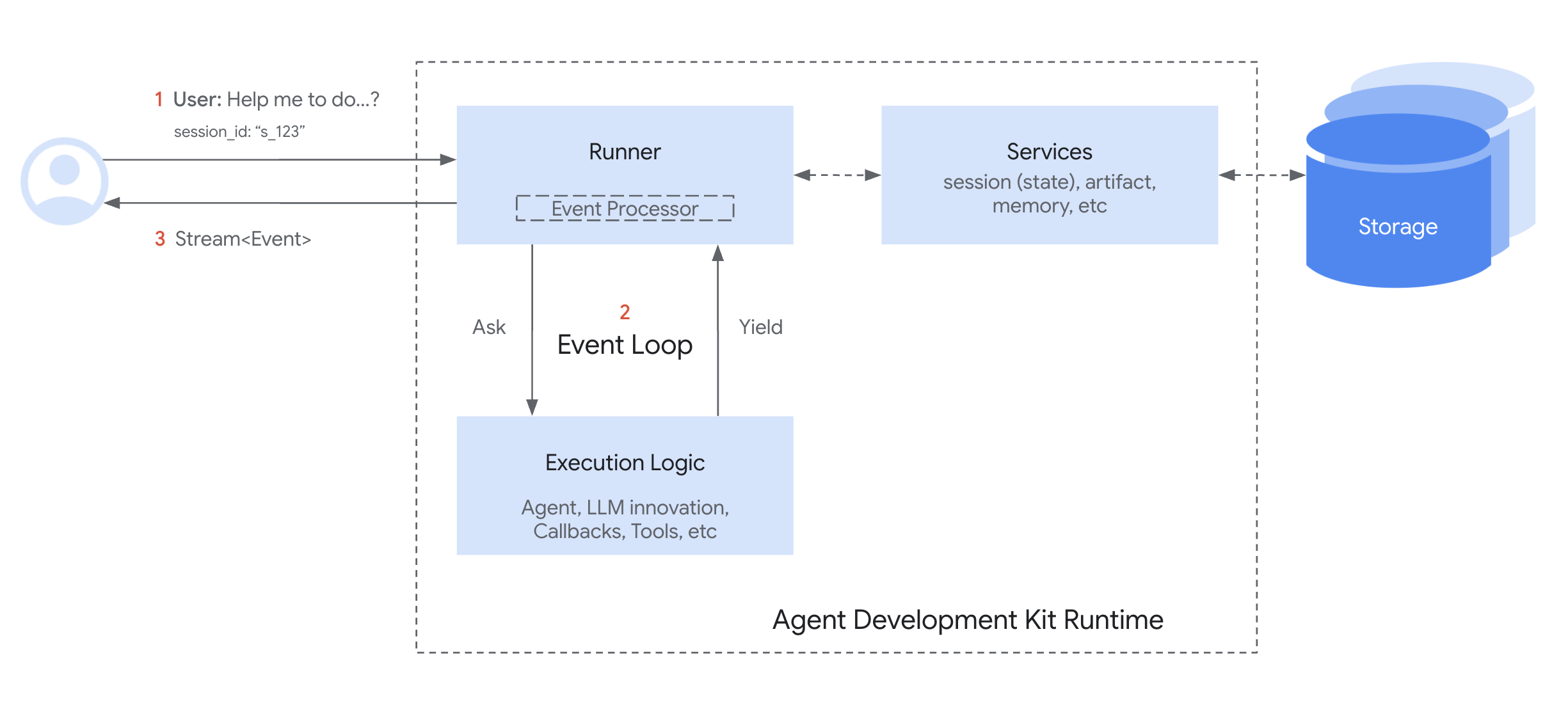
以下是 Session 和 SessionService 在对话轮次中协同工作的简化流程:
- 启动或恢复: 你的应用需要使用
SessionService来create_session(创建新对话)或使用现有的 session id。 - 提供上下文:
Runner从相应的服务方法中获取适当的Session对象,为智能体提供对相应会话state和events的访问。 - 智能体处理: 用户向智能体发送查询。智能体分析查询以及会话
state和events历史记录,以确定响应。 - 响应与状态更新: 智能体生成响应(并可能标记需要在
state中更新的数据)。Runner将其打包为Event。 - 保存交互:
Runner调用sessionService.append_event(session, event),以session和新的event作为参数。服务将Event添加到历史记录中,并根据事件中的信息更新存储中会话的state。会话的last_update_time也会得到更新。 - 准备下一轮: 智能体的响应发送给用户。更新后的
Session现在由SessionService存储,为下一轮做好准备(通常在当前会话中继续对话,从步骤 1 重新开始循环)。 - 结束对话: 当对话结束时,你的应用调用
sessionService.delete_session(...)来清理不再需要的已存储会话数据。
此循环展示了 SessionService 如何通过管理与每个 Session 对象关联的历史记录和状态来确保对话的连续性。
使用 SessionService 管理会话
如上所示,你通常不会直接创建或管理 Session 对象,而是通过 SessionService。该服务作为会话生命周期的中央管理者。
其核心职责包括:
- 开始新对话: 当用户开始交互时,创建新的
Session对象。 - 恢复现有对话: 检索特定的
Session(使用其 ID),以便智能体可以从上次中断的地方继续。 - 保存进度: 将新的交互(
Event对象)追加到会话的历史记录中。这也是会话state得以更新的机制(更多内容请参阅State章节)。 - 列出对话: 查找特定用户和应用程序的活跃会话线程。
- 清理: 当对话结束或不再需要时,删除
Session对象及其关联数据。
SessionService 实现
ADK 提供了多种 SessionService 实现,你可以选择最适合需求的存储后端:
- 工作原理: 将所有会话数据直接存储在应用程序的内存中。
- 持久性: 无。如果应用程序重启,所有对话数据都会丢失。
- 要求: 无需额外配置。
- 适用场景: 快速开发、本地测试、示例,以及不需要长期持久性的场景。
VertexAiSessionService
- 工作原理: 通过 API 调用使用 Google Cloud Agent Platform 基础设施进行会话管理。
- 持久性: 有。数据通过 Agent Runtime 可靠且可扩展地管理。
- 要求:
- 一个 Google Cloud 项目。
gcp扩展包,通过pip install google-adk[gcp]安装。- 一个 Google Cloud 存储桶,可按此步骤配置。
- 一个 Agent Runtime 资源名称/ID,可按此教程设置。
- 如果你没有 Google Cloud 项目且想试用 VertexAiSessionService,请参阅 Agent Platform 快速模式。
- 适用场景: 部署在 Google Cloud 上的可扩展生产应用程序,特别是与其他 Agent Platform 功能集成时。
# 需要安装:pip install google-adk[gcp]
# 加上 GCP 设置和身份验证
from google.adk.sessions import VertexAiSessionService

PROJECT_ID = "你的-gcp-项目-id"
LOCATION = "us-central1"
# 此服务使用的 app_name 应为 Reasoning Engine 的 ID 或名称
REASONING_ENGINE_APP_NAME = "projects/你的-gcp-项目-id/locations/us-central1/reasoningEngines/你的-engine-id"

session_service = VertexAiSessionService(project=PROJECT_ID, location=LOCATION)
# 调用服务方法时使用 REASONING_ENGINE_APP_NAME,例如:
# session = await session_service.create_session(app_name=REASONING_ENGINE_APP_NAME, ...)
import "google.golang.org/adk/v2/session"

// 2. VertexAiSessionService
// 在运行前,确保你的环境已通过身份验证:
// gcloud auth application-default login
// export GOOGLE_CLOUD_PROJECT="你的-gcp-项目-id"
// export GOOGLE_CLOUD_LOCATION="你的-gcp-地区"

modelName := "gemini-flash-latest" // 替换为你需要的模型
vertexService, err := session.VertexAIService(ctx, modelName)
if err != nil {
  log.Printf("无法初始化 VertexAIService(如果未设置 gcloud 项目,这是预料之中的):%v", err)
} else {
  fmt.Println("成功初始化 VertexAIService。")
}
// 请查看上面的要求说明,并随后在你的 bashrc 文件中导出以下内容:
// export GOOGLE_CLOUD_PROJECT=我的_gcp_项目
// export GOOGLE_CLOUD_LOCATION=us-central1
// export GOOGLE_API_KEY=我的_api_密钥

import com.google.adk.sessions.VertexAiSessionService;
import java.util.UUID;

String sessionId = UUID.randomUUID().toString();
String reasoningEngineAppName = "123456789";
String userId = "u_123"; // 示例用户 id
ConcurrentMap<String, Object> initialState = new
    ConcurrentHashMap<>(); // 本示例不需要初始状态

VertexAiSessionService sessionService = new VertexAiSessionService();
Session mySession =
    sessionService
        .createSession(reasoningEngineAppName, userId, initialState, Optional.of(sessionId))
        .blockingGet();
VertexAiSessionService is JVM-only in ADK Kotlin. It is not available on
Android; use it from a server-side agent.
import com.google.adk.kt.sessions.SessionKey
import com.google.adk.kt.sessions.VertexAiSessionService
import kotlinx.coroutines.runBlocking

// The reasoning engine is pinned here, at construction. In the other tabs
// the engine is chosen per call, through `app_name`; in Kotlin `appName`
// is never parsed for it and is only a label on the session.
val sessionService =
    VertexAiSessionService(
        project = "your-gcp-project-id",
        location = "us-central1",
        // The bare numeric engine id. A full
        // "projects/.../reasoningEngines/..." resource name is rejected;
        // project and location are separate arguments.
        reasoningEngineId = "1234567890",
    )

// Session methods are suspend functions; `runBlocking` here is the
// counterpart of the Java tab's `.blockingGet()`.
val mySession = runBlocking {
    // A null id lets the service assign one.
    sessionService.createSession(SessionKey("example-app", "u_123", id = null))
}
有关从 ADK 智能体连接到 Google Cloud 的更多信息,请参阅连接到 Google Cloud 和 Agent Platform。
DatabaseSessionService
- 工作原理: 连接到关系数据库(如 PostgreSQL、MySQL、SQLite)以在表中持久存储会话数据。
- 持久性: 有。数据在应用程序重启后仍然存在。
- 要求: 一个已配置的数据库和
db扩展包,通过pip install google-adk[db]安装。 - 适用场景: 需要你自己管理的可靠、持久存储的应用程序。
from google.adk.sessions import DatabaseSessionService
# 示例:使用本地 SQLite 文件:
# 注意:该实现需要异步数据库驱动程序。
# 对于 SQLite,请使用 'sqlite+aiosqlite' 而不是 'sqlite' 以确保异步兼容性。
db_url = "sqlite+aiosqlite:///./my_agent_data.db"
session_service = DatabaseSessionService(db_url=db_url)
并发与锁定
DatabaseSessionService 通过两层锁定架构确保并发操作期间的数据完整性:
- 进程内锁定: 该服务使用内部的进程内锁来序列化同一会话的
append_event调用。这可以防止同一进程内多个请求同时尝试更新同一会话时的竞态条件。 - 行级锁定: 对于 PostgreSQL、MySQL 和 MariaDB,该服务使用行级锁定(通过
SELECT ... FOR UPDATE)来防止多个进程或副本同时尝试更新同一会话时的竞态条件。
异步驱动程序要求
DatabaseSessionService 需要异步数据库驱动程序。使用 SQLite 时,你必须在连接字符串中使用 sqlite+aiosqlite 而不是 sqlite。对于其他数据库(PostgreSQL、MySQL),请确保使用兼容异步的驱动程序,例如 PostgreSQL 使用 asyncpg,MySQL 使用 aiomysql。
ADK Python v1.22.0 中的会话数据库架构更改
ADK Python v1.22.0 中会话数据库的架构发生了变化,需要对会话数据库进行迁移。有关更多信息,请参阅 会话数据库架构迁移 (Session database schema migration)。
会话错误排查
在执行过程中,ADK 可能会抛出特定异常,以帮助你识别配置或状态问题。
SessionNotFoundError
当运行器尝试访问或执行活动会话存储中不存在的会话时,会抛出此异常。它继承自 ValueError 以保持向后兼容性。
- 常见原因: 无效、过期或缺失的
session_id;在会话创建之前运行会话。 - 解决方法: 确保通过
create_session(...)先创建会话,或者使用auto_create_session=True构造Runner。