使用 Java 构建流式智能体
本快速入门指南将带你完成创建基础智能体并结合 Java 的 ADK Streaming 实现低延迟、双向语音交互的全过程。
你将从设置 Java 和 Maven 环境、构建项目结构、定义所需依赖开始。随后,你会创建一个简单的 ScienceTeacherAgent,通过 Dev UI 测试其基于文本的流式能力,并进一步启用实时音频通信,将你的智能体升级为交互式语音应用。
创建你的第一个智能体
前置条件
-
在本入门指南中,你将使用 Java 进行编程。请检查你的机器上是否已安装 Java。建议使用 Java 17 或更高版本(可通过 java -version 命令检查)。
-
你还将使用 Java 的 Maven 构建工具。请确保你的机器上已安装 Maven(Cloud Top 或 Cloud Shell 通常已安装,但本地电脑未必如此)。
准备项目结构
要开始使用 ADK Java,请创建如下目录结构的 Maven 项目:
请参考 安装 页面,添加用于引入 ADK 包的 pom.xml。
Note
你可以自由选择项目根目录的名称(不一定要叫 adk-agents)
运行一次编译
让我们通过运行一次编译(mvn compile 命令)来检查 Maven 构建是否正常:
$ mvn compile
[INFO] Scanning for projects...
[INFO]
[INFO] --------------------< adk-agents:adk-agents >--------------------
[INFO] Building adk-agents 1.0-SNAPSHOT
[INFO]   from pom.xml
[INFO] --------------------------------[ jar ]---------------------------------
[INFO]
[INFO] --- resources:3.3.1:resources (default-resources) @ adk-demo ---
[INFO] skip non existing resourceDirectory /home/user/adk-demo/src/main/resources
[INFO]
[INFO] --- compiler:3.13.0:compile (default-compile) @ adk-demo ---
[INFO] Nothing to compile - all classes are up to date.
[INFO] ------------------------------------------------------------------------
[INFO] BUILD SUCCESS
[INFO] ------------------------------------------------------------------------
[INFO] Total time:  1.347 s
[INFO] Finished at: 2025-05-06T15:38:08Z
[INFO] ------------------------------------------------------------------------
看起来项目已经可以正常编译了!
创建智能体
在 src/main/java/agents/ 目录下创建 ScienceTeacherAgent.java 文件,内容如下:
package samples.liveaudio;

import com.google.adk.agents.BaseAgent;
import com.google.adk.agents.LlmAgent;

/** 科学老师智能体。 */
public class ScienceTeacherAgent {

  // Dev UI 用于动态加载智能体的字段
  // (智能体必须在声明时初始化)
  public static final BaseAgent ROOT_AGENT = initAgent();

  // 请从 https://adk.dev/get-started/streaming/quickstart-streaming/#supported-models
  // 填写支持实时 API 的最新模型 ID
  public static BaseAgent initAgent() {
    return LlmAgent.builder()
        .name("science-app")
        .description("科学老师智能体")
        .model("...") // 请填写支持实时 API 的最新模型 ID
        .instruction("""
            你是一位友好的科学老师,负责向儿童和青少年解释科学概念。
            """)
        .build();
  }
}
稍后我们将使用 Dev UI 运行此智能体。为了让工具自动识别智能体,其 Java 类必须遵守以下两个规则:
- 智能体应存储在名为 ROOT_AGENT 的 public static 变量中,类型为 BaseAgent,并在声明时初始化。
- 智能体定义必须是 static 方法,以便在类初始化时由动态编译类加载器加载。
使用 Dev UI 运行智能体
Dev UI 是一个网页服务器,你可以在其中快速运行和测试智能体,而无需为智能体构建自己的 UI 应用程序。
定义环境变量
要运行服务器,你需要导出两个环境变量:
- 一个你可以从 AI Studio 获取的 Gemini 密钥,
- 一个用于指定我们本次不使用 Agent Platform 的变量。
运行 Dev UI
从终端运行以下命令以启动 Dev UI。
mvn exec:java \
    -Dexec.mainClass="com.google.adk.web.AdkWebServer" \
    -Dexec.args="--adk.agents.source-dir=." \
    -Dexec.classpathScope="compile"
步骤 1: 直接在浏览器中打开提供的 URL(通常是 http://localhost:8080 或 http://127.0.0.1:8080)。
步骤 2: 在 UI 的左上角,你可以从下拉菜单中选择你的智能体。选择 "science-app"。
故障排查
如果你在下拉菜单中没有看到 “science-app”,请确保你是在 Maven 项目的根目录下运行 mvn 命令。
注意:ADK Web 仅限开发使用
ADK Web 不适用于生产部署。你应该仅将 ADK Web 用于开发和调试目的。
使用语音和视频测试 Dev UI
使用你喜欢的浏览器,访问:http://127.0.0.1:8080/
你应该看到如下界面:
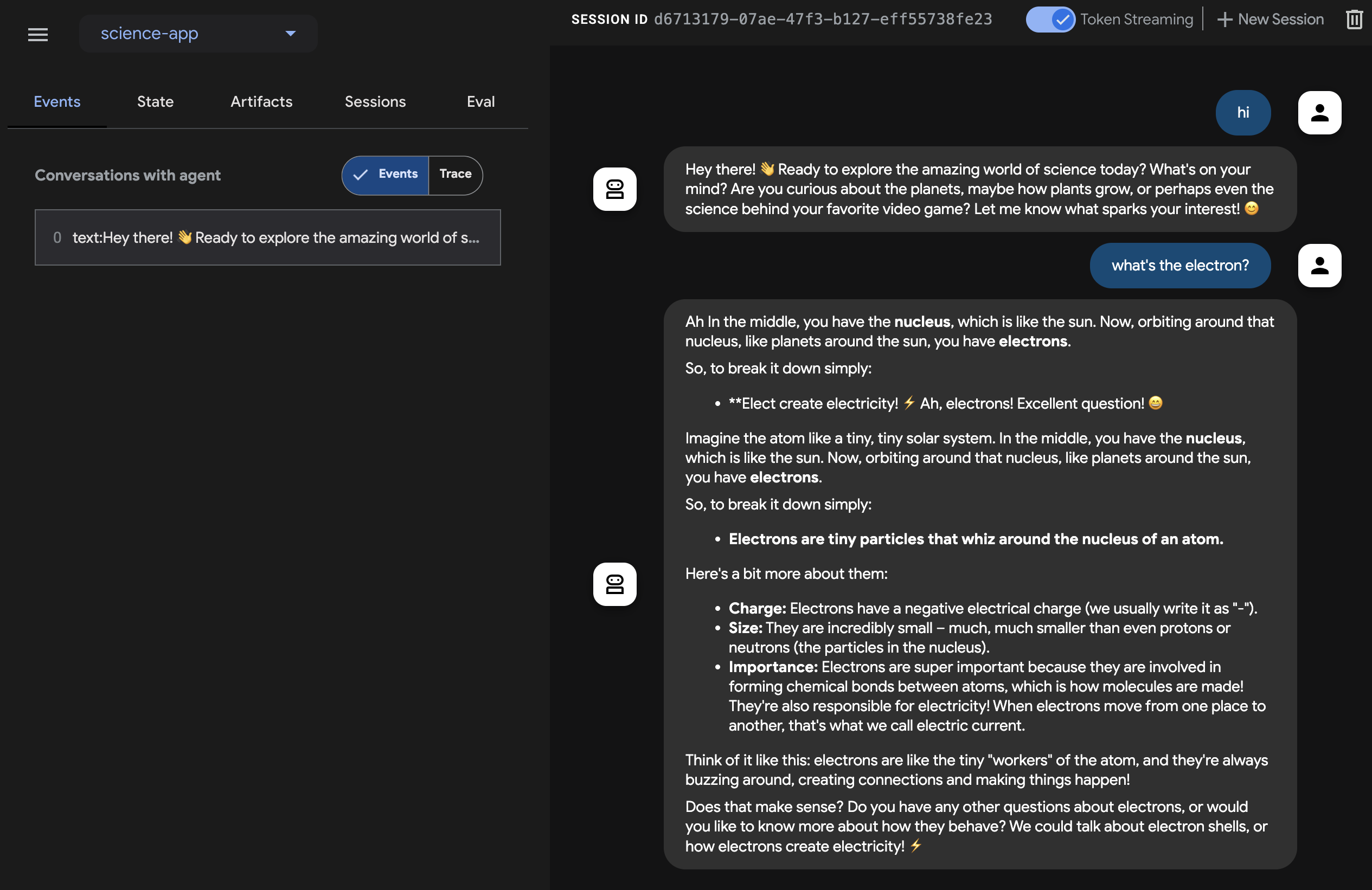
点击麦克风按钮启用语音输入,并用语音询问一个问题,例如“Electron 是什么?”。你将实时听到语音回答。
要尝试视频,请重新加载浏览器,点击相机按钮启用视频输入,并询问类似“你看到了什么?”的问题。智能体会根据视频输入回答。
注意事项
- 你不能使用原生音频模型进行文本聊天。在
adk web上输入文本消息时会看到错误。
停止工具
按 Ctrl-C 在控制台中停止工具。
使用智能体与自定义实时音频应用
现在,让我们尝试使用智能体和自定义实时音频应用进行音频流式传输。
一个用于实时音频的 Maven pom.xml 构建文件
将你现有的 pom.xml 替换为以下内容。
<?xml version="1.0" encoding="UTF-8"?>
<project xmlns="http://maven.apache.org/POM/4.0.0"
  xmlns:xsi="http://www.w3.org/2001/XMLSchema-instance"
  xsi:schemaLocation="http://maven.apache.org/POM/4.0.0 http://maven.apache.org/xsd/maven-4.0.0.xsd">
  <modelVersion>4.0.0</modelVersion>

  <groupId>com.google.adk.samples</groupId>
  <artifactId>google-adk-sample-live-audio</artifactId>
  <version>0.1.0</version>
  <name>Google ADK - 示例 - 实时音频</name>
  <description>
    演示使用 ADK 进行实时语音对话的示例应用程序,
    可通过 samples.liveaudio.LiveAudioRun 运行。
  </description>
  <packaging>jar</packaging>

  <properties>
    <project.build.sourceEncoding>UTF-8</project.build.sourceEncoding>
    <java.version>17</java.version>
    <auto-value.version>1.11.0</auto-value.version>
    <!-- exec-maven-plugin 的主类 -->
    <exec.mainClass>samples.liveaudio.LiveAudioRun</exec.mainClass>
    <google-adk.version>1.6.0</google-adk.version>
  </properties>

  <dependencyManagement>
    <dependencies>
      <dependency>
        <groupId>com.google.cloud</groupId>
        <artifactId>libraries-bom</artifactId>
        <version>26.53.0</version>
        <type>pom</type>
        <scope>import</scope>
      </dependency>
    </dependencies>
  </dependencyManagement>

  <dependencies>
    <dependency>
      <groupId>com.google.adk</groupId>
      <artifactId>google-adk</artifactId>
      <version>${google-adk.version}</version>
    </dependency>
    <dependency>
      <groupId>commons-logging</groupId>
      <artifactId>commons-logging</artifactId>
      <version>1.2</version> <!-- 或使用父 POM 中定义的属性 -->
    </dependency>
  </dependencies>

  <build>
    <plugins>
      <plugin>
        <groupId>org.apache.maven.plugins</groupId>
        <artifactId>maven-compiler-plugin</artifactId>
        <version>3.13.0</version>
        <configuration>
          <source>${java.version}</source>
          <target>${java.version}</target>
          <parameters>true</parameters>
          <annotationProcessorPaths>
            <path>
              <groupId>com.google.auto.value</groupId>
              <artifactId>auto-value</artifactId>
              <version>${auto-value.version}</version>
            </path>
          </annotationProcessorPaths>
        </configuration>
      </plugin>
      <plugin>
        <groupId>org.codehaus.mojo</groupId>
        <artifactId>build-helper-maven-plugin</artifactId>
        <version>3.6.0</version>
        <executions>
          <execution>
            <id>add-source</id>
            <phase>generate-sources</phase>
            <goals>
              <goal>add-source</goal>
            </goals>
            <configuration>
              <sources>
                <source>.</source>
              </sources>
            </configuration>
          </execution>
        </executions>
      </plugin>
      <plugin>
        <groupId>org.codehaus.mojo</groupId>
        <artifactId>exec-maven-plugin</artifactId>
        <version>3.2.0</version>
        <configuration>
          <mainClass>${exec.mainClass}</mainClass>
          <classpathScope>runtime</classpathScope>
        </configuration>
      </plugin>
    </plugins>
  </build>
</project>
创建实时音频运行工具
在 src/main/java/ 目录下创建 LiveAudioRun.java 文件,内容如下。此工具运行智能体并使用实时音频输入和输出。
package samples.liveaudio;

import com.google.adk.agents.LiveRequestQueue;
import com.google.adk.agents.RunConfig;
import com.google.adk.events.Event;
import com.google.adk.runner.Runner;
import com.google.adk.sessions.InMemorySessionService;
import com.google.common.collect.ImmutableList;
import com.google.genai.types.Blob;
import com.google.genai.types.Modality;
import com.google.genai.types.PrebuiltVoiceConfig;
import com.google.genai.types.Content;
import com.google.genai.types.Part;
import com.google.genai.types.SpeechConfig;
import com.google.genai.types.VoiceConfig;
import io.reactivex.rxjava3.core.Flowable;
import java.io.ByteArrayOutputStream;
import java.io.InputStream;
import java.net.URL;
import javax.sound.sampled.AudioFormat;
import javax.sound.sampled.AudioInputStream;
import javax.sound.sampled.AudioSystem;
import javax.sound.sampled.DataLine;
import javax.sound.sampled.LineUnavailableException;
import javax.sound.sampled.Mixer;
import javax.sound.sampled.SourceDataLine;
import javax.sound.sampled.TargetDataLine;
import java.util.UUID;
import java.util.concurrent.ExecutorService;
import java.util.concurrent.ConcurrentHashMap;
import java.util.concurrent.ConcurrentMap;
import java.util.concurrent.Executors;
import java.util.concurrent.Future;
import java.util.concurrent.TimeUnit;
import java.util.concurrent.atomic.AtomicBoolean;
import agents.ScienceTeacherAgent;

/** 演示运行 {@link LiveAudioAgent} 进行语音对话的主类。 */
public final class LiveAudioRun {
  private final String userId;
  private final String sessionId;
  private final Runner runner;

  private static final javax.sound.sampled.AudioFormat MIC_AUDIO_FORMAT =
      new javax.sound.sampled.AudioFormat(16000.0f, 16, 1, true, false);

  private static final javax.sound.sampled.AudioFormat SPEAKER_AUDIO_FORMAT =
      new javax.sound.sampled.AudioFormat(24000.0f, 16, 1, true, false);

  private static final int BUFFER_SIZE = 4096;

  public LiveAudioRun() {
    this.userId = "test_user";
    String appName = "LiveAudioApp";
    this.sessionId = UUID.randomUUID().toString();

    InMemorySessionService sessionService = new InMemorySessionService();
    this.runner = new Runner(ScienceTeacherAgent.ROOT_AGENT, appName, null, sessionService);

    ConcurrentMap<String, Object> initialState = new ConcurrentHashMap<>();
    var unused =
        sessionService.createSession(appName, userId, initialState, sessionId).blockingGet();
  }

  private void runConversation() throws Exception {
    System.out.println("正在初始化麦克风输入和扬声器输出...");

    RunConfig runConfig =
        RunConfig.builder()
            .setStreamingMode(RunConfig.StreamingMode.BIDI)
            .setResponseModalities(ImmutableList.of(new Modality("AUDIO")))
            .setSpeechConfig(
                SpeechConfig.builder()
                    .voiceConfig(
                        VoiceConfig.builder()
                            .prebuiltVoiceConfig(
                                PrebuiltVoiceConfig.builder().voiceName("Aoede").build())
                            .build())
                    .languageCode("en-US")
                    .build())
            .build();

    LiveRequestQueue liveRequestQueue = new LiveRequestQueue();

    Flowable<Event> eventStream =
        this.runner.runLive(
            runner.sessionService().createSession(userId, sessionId).blockingGet(),
            liveRequestQueue,
            runConfig);

    AtomicBoolean isRunning = new AtomicBoolean(true);
    AtomicBoolean conversationEnded = new AtomicBoolean(false);
    ExecutorService executorService = Executors.newFixedThreadPool(2);

    // 捕获麦克风输入的任务
    Future<?> microphoneTask =
        executorService.submit(() -> captureAndSendMicrophoneAudio(liveRequestQueue, isRunning));

    // 处理智能体响应和播放音频的任务
    Future<?> outputTask =
        executorService.submit(
            () -> {
              try {
                processAudioOutput(eventStream, isRunning, conversationEnded);
              } catch (Exception e) {
                System.err.println("处理音频输出时出错: " + e.getMessage());
                e.printStackTrace();
                isRunning.set(false);
              }
            });

    // 等待用户按 Enter 停止对话
    System.out.println("对话已开始。按 Enter 键停止...");
    System.in.read();

    System.out.println("正在结束对话...");
    isRunning.set(false);

    try {
      // 留出一些时间让正在进行的处理完成
      microphoneTask.get(2, TimeUnit.SECONDS);
      outputTask.get(2, TimeUnit.SECONDS);
    } catch (Exception e) {
      System.out.println("正在停止任务...");
    }

    liveRequestQueue.close();
    executorService.shutdownNow();
    System.out.println("对话已结束。");
  }

  private void captureAndSendMicrophoneAudio(
      LiveRequestQueue liveRequestQueue, AtomicBoolean isRunning) {
    TargetDataLine micLine = null;
    try {
      DataLine.Info info = new DataLine.Info(TargetDataLine.class, MIC_AUDIO_FORMAT);
      if (!AudioSystem.isLineSupported(info)) {
        System.err.println("不支持麦克风线路!");
        return;
      }

      micLine = (TargetDataLine) AudioSystem.getLine(info);
      micLine.open(MIC_AUDIO_FORMAT);
      micLine.start();

      System.out.println("麦克风已初始化。开始说话...");

      byte[] buffer = new byte[BUFFER_SIZE];
      int bytesRead;

      while (isRunning.get()) {
        bytesRead = micLine.read(buffer, 0, buffer.length);

        if (bytesRead > 0) {
          byte[] audioChunk = new byte[bytesRead];
          System.arraycopy(buffer, 0, audioChunk, 0, bytesRead);

          Blob audioBlob = Blob.builder().data(audioChunk).mimeType("audio/pcm").build();

          liveRequestQueue.realtime(audioBlob);
        }
      }
    } catch (LineUnavailableException e) {
      System.err.println("访问麦克风时出错: " + e.getMessage());
      e.printStackTrace();
    } finally {
      if (micLine != null) {
        micLine.stop();
        micLine.close();
      }
    }
  }

  private void processAudioOutput(
      Flowable<Event> eventStream, AtomicBoolean isRunning, AtomicBoolean conversationEnded) {
    SourceDataLine speakerLine = null;
    try {
      DataLine.Info info = new DataLine.Info(SourceDataLine.class, SPEAKER_AUDIO_FORMAT);
      if (!AudioSystem.isLineSupported(info)) {
        System.err.println("不支持扬声器线路!");
        return;
      }

      final SourceDataLine finalSpeakerLine = (SourceDataLine) AudioSystem.getLine(info);
      finalSpeakerLine.open(SPEAKER_AUDIO_FORMAT);
      finalSpeakerLine.start();

      System.out.println("扬声器已初始化。");

      for (Event event : eventStream.blockingIterable()) {
        if (!isRunning.get()) {
          break;
        }

        AtomicBoolean audioReceived = new AtomicBoolean(false);
        processEvent(event, audioReceived);

        event.content().ifPresent(content -> content.parts().ifPresent(parts -> parts.forEach(part -> playAudioData(part, finalSpeakerLine))));
      }

      speakerLine = finalSpeakerLine; // 赋值给外部变量以便在 finally 块中清理
    } catch (LineUnavailableException e) {
      System.err.println("访问扬声器时出错: " + e.getMessage());
      e.printStackTrace();
    } finally {
      if (speakerLine != null) {
        speakerLine.drain();
        speakerLine.stop();
        speakerLine.close();
      }
      conversationEnded.set(true);
    }
  }

  private void playAudioData(Part part, SourceDataLine speakerLine) {
    part.inlineData()
        .ifPresent(
            inlineBlob ->
                inlineBlob
                    .data()
                    .ifPresent(
                        audioBytes -> {
                          if (audioBytes.length > 0) {
                            System.out.printf(
                                "正在播放音频 (%s): %d 字节%n",
                                inlineBlob.mimeType(),
                                audioBytes.length);
                            speakerLine.write(audioBytes, 0, audioBytes.length);
                          }
                        }));
  }

  private void processEvent(Event event, java.util.concurrent.atomic.AtomicBoolean audioReceived) {
    event
        .content()
        .ifPresent(
            content ->
                content
                    .parts()
                    .ifPresent(parts -> parts.forEach(part -> logReceivedAudioData(part, audioReceived))));
  }

  private void logReceivedAudioData(Part part, AtomicBoolean audioReceived) {
    part.inlineData()
        .ifPresent(
            inlineBlob ->
                inlineBlob
                    .data()
                    .ifPresent(
                        audioBytes -> {
                          if (audioBytes.length > 0) {
                            System.out.printf(
                                "    音频 (%s): 接收到 %d 字节。%n",
                                inlineBlob.mimeType(),
                                audioBytes.length);
                            audioReceived.set(true);
                          } else {
                            System.out.printf(
                                "    音频 (%s): 接收到空的音频数据。%n",
                                inlineBlob.mimeType());
                          }
                        }));
  }

  public static void main(String[] args) throws Exception {
    LiveAudioRun liveAudioRun = new LiveAudioRun();
    liveAudioRun.runConversation();
    System.out.println("退出实时音频运行。");
  }
}
运行实时音频运行工具
要运行实时音频运行工具,请在 adk-agents 目录下使用以下命令:
然后你应该看到:
有了这条消息,工具就准备接受语音输入了。向智能体提出类似 Electron 是什么? 的问题。
Caution
当你观察到智能体持续自言自语而不停止时,请尝试使用耳机抑制回声。
总结
ADK Streaming 使开发者能够创建具备低延迟、双向语音和视频通信能力的智能体,从而增强交互体验。本文展示了文本流式是 ADK 智能体的内置功能,无需额外特定代码,同时也展示了如何实现实时音频对话,以实现与智能体的实时语音交互。这使得用户可以自然流畅地与智能体进行交流。