插件
ADK 中的插件是一个自定义代码模块,可以使用回调钩子在智能体工作流生命周期的各个阶段执行。当你需要实现适用于整个智能体工作流的功能时,可以使用插件。插件的一些典型应用如下:
- 日志记录与追踪:创建详细的智能体、工具和生成式 AI 模型活动日志,用于调试和性能分析。
- 策略执行:实现安全护栏,例如检查用户是否有权使用特定工具、并在其无权限时阻止执行的函数。
- 监控与指标:收集并导出 token 使用量、执行时间和调用次数等指标到 Prometheus 或 Google Cloud Observability(前身为 Stackdriver)等监控系统。
- 响应缓存:检查请求是否已被处理过,以便返回缓存的响应,跳过昂贵或耗时的 AI 模型或工具调用。
- 请求或响应修改:动态向 AI 模型提示词添加信息,或标准化工具输出响应。
提示:将插件用于安全功能
在实现安全护栏和策略时,使用 ADK 插件比使用回调具有更好的模块化和灵活性。有关更多详细信息,请参阅 用于安全护栏的回调与插件 (Callbacks and Plugins for Security Guardrails)。
提示:ADK 集成
有关 ADK 的预置插件和其他集成列表,请参阅 工具与集成 (Tools and Integrations)。
插件如何工作?
ADK 插件扩展了 BasePlugin 类并包含一个或多个 callback 方法,指示插件应该在智能体生命周期的哪个位置执行。你通过在智能体的 Runner 类中(在 Python 中也可以是 App 对象中)注册插件来将其集成到智能体中。有关如何在智能体应用程序中触发插件以及在哪里触发插件的更多信息,请参阅 插件回调钩子。
插件功能建立在回调的基础上,这是 ADK 可扩展架构的关键设计元素。虽然典型的智能体回调配置在单个智能体、单个工具上用于特定任务,但插件在 Runner 上(在 Python 中则是在 App 上)注册一次,其回调全局应用于该运行器管理的每个智能体、工具和 LLM 调用。插件让你可以将相关的回调函数打包在一起以在工作流中使用。这使得插件成为实现跨越整个智能体应用程序功能的理想解决方案。
预置插件
ADK 包含多个可立即添加到智能体工作流的插件:
- 反思与重试工具 (Reflect and Retry Tools): 跟踪工具故障并智能重试工具请求。
- BigQuery 分析 (BigQuery Analytics): 启用智能体日志记录和分析(使用 BigQuery)。
- Model Armor: 根据 Google Cloud Model Armor 模板筛选用户输入和模型输出。
- 上下文过滤器 (Context Filter): 过滤生成式 AI 上下文以减小其大小。
- 全局指令 (Global Instruction): 在应用级别提供全局指令功能的插件。
- 将文件保存为制品 (Save Files as Artifacts): 将用户消息中包含的文件另存为制品 (Artifacts)。
- 自动追踪 (Auto Tracing): 将你智能体自身包中的函数封装到 OpenTelemetry span 中。
- 多模态工具结果 (Multimodal Tool Results): 让函数工具直接向模型返回内容部分 (content parts)。
- 日志记录 (Logging): 在每个智能体工作流回调点记录重要信息。
- 调试日志 (Debug Logging): 将每次调用的完整调试信息捕获到 YAML 文件中。
- 反思与重试模型 (Reflect and Retry Model): 当响应以错误(如格式错误的函数调用)结尾时,让模型重试。
- 工具调用完整性 (Tool Call Integrity): 使用密钥对会话中存储的每个函数调用进行签名,只有在调用签名验证通过时才运行工具。作为工作流节点运行的工具不进行检查。
查看 ADK 集成 (ADK Integrations) 页面,了解更多适用于你的智能体的原生和第三方插件。
定义和注册插件
本节介绍如何定义插件类并将其注册为智能体工作流的一部分。有关完整的代码示例,请参阅仓库中的 Plugin Basic。
创建插件类
首先扩展 BasePlugin 类并添加一个或多个 callback 方法,如以下代码示例所示:
from google.adk.agents.base_agent import BaseAgent
from google.adk.agents.callback_context import CallbackContext
from google.adk.models.llm_request import LlmRequest
from google.adk.plugins.base_plugin import BasePlugin

class CountInvocationPlugin(BasePlugin):
    """一个计算智能体和工具调用次数的自定义插件。"""

    def __init__(self) -> None:
        """使用计数器初始化插件。"""
        super().__init__(name="count_invocation")
        self.agent_count: int = 0
        self.tool_count: int = 0
        self.llm_request_count: int = 0

    async def before_agent_callback(
        self, *, agent: BaseAgent, callback_context: CallbackContext
    ) -> None:
        """计算智能体运行次数。"""
        self.agent_count += 1
        print(f"[Plugin] Agent run count: {self.agent_count}")

    async def before_model_callback(
        self, *, callback_context: CallbackContext, llm_request: LlmRequest
    ) -> None:
        """计算 LLM 请求次数。"""
        self.llm_request_count += 1
        print(f"[Plugin] LLM request count: {self.llm_request_count}")
import { BaseAgent, BasePlugin, Context } from "@google/adk";
import type { LlmRequest, LlmResponse } from "@google/adk";
import type { Content } from "@google/genai";

/**
 * 一个计算智能体和工具调用次数的自定义插件。
 */
export class CountInvocationPlugin extends BasePlugin {
    public agentCount = 0;
    public toolCount = 0;
    public llmRequestCount = 0;

    constructor() {
        super("count_invocation");
    }

    /**
     * 计算智能体运行次数。
     */
    async beforeAgentCallback(
        agent: BaseAgent,
        context: Context
    ): Promise<Content | undefined> {
        this.agentCount++;
        console.log(`[Plugin] Agent run count: ${this.agentCount}`);
        return undefined;
    }

    /**
     * 计算 LLM 请求次数。
     */
    async beforeModelCallback(
        context: Context,
        llmRequest: LlmRequest
    ): Promise<LlmResponse | undefined> {
        this.llmRequestCount++;
        console.log(`[Plugin] LLM request count: ${this.llmRequestCount}`);
        return undefined;
    }
}
import com.google.adk.agents.BaseAgent;
import com.google.adk.agents.CallbackContext;
import com.google.adk.models.LlmRequest;
import com.google.adk.models.LlmResponse;
import com.google.adk.plugins.BasePlugin;
import com.google.genai.types.Content;
import io.reactivex.rxjava3.core.Maybe;

/** 一个计算智能体和工具调用次数的自定义插件。 */
public class CountInvocationPlugin extends BasePlugin {
  public int agentCount = 0;
  public int toolCount = 0;
  public int llmRequestCount = 0;

  public CountInvocationPlugin() {
    super("count_invocation");
  }

  /** 计算智能体运行次数。 */
  @Override
  public Maybe<Content> beforeAgentCallback(BaseAgent agent, CallbackContext callbackContext) {
    agentCount++;
    System.out.println("[Plugin] Agent run count: " + agentCount);
    return Maybe.empty();
  }

  /** 计算 LLM 请求次数。 */
  @Override
  public Maybe<LlmResponse> beforeModelCallback(
      CallbackContext callbackContext, LlmRequest.Builder llmRequest) {
    llmRequestCount++;
    System.out.println("[Plugin] LLM request count: " + llmRequestCount);
    return Maybe.empty();
  }
}
package main

import (
    "fmt"

    "google.golang.org/adk/v2/agent"
    "google.golang.org/adk/v2/agent/llmagent"
    "google.golang.org/adk/v2/model"
    "google.golang.org/adk/v2/plugin"
    "google.golang.org/genai"
)

/**
 * 一个计算智能体和工具调用次数的自定义插件。
 */
type CountInvocationPlugin struct {
    AgentCount      int
    ToolCount       int
    LlmRequestCount int
}

func NewCountInvocationPlugin() (*plugin.Plugin, error) {
    p := &CountInvocationPlugin{}
    return plugin.New(plugin.Config{
        Name:                "count_invocation",
        BeforeAgentCallback: p.BeforeAgentCallback,
        BeforeModelCallback: p.BeforeModelCallback,
    })
}

/**
 * 计算智能体运行次数。
 */
func (p *CountInvocationPlugin) BeforeAgentCallback(ctx agent.CallbackContext) (*genai.Content, error) {
    p.AgentCount++
    fmt.Printf("[Plugin] Agent run count: %d\n", p.AgentCount)
    return nil, nil
}

/**
 * 计算 LLM 请求次数。
 */
func (p *CountInvocationPlugin) BeforeModelCallback(ctx agent.CallbackContext, req *model.LLMRequest) (*model.LLMResponse, error) {
    p.LlmRequestCount++
    fmt.Printf("[Plugin] LLM request count: %d\n", p.LlmRequestCount)
    return nil, nil
}
/** A custom plugin that counts agent runs and LLM requests. */
class CountInvocationPlugin : Plugin {
    override val name = "count_invocation"

    var agentCount = 0
        private set

    var llmRequestCount = 0
        private set

    // Plugin declares one abstract member, `name`; every callback has a default,
    // so a plugin only overrides the ones it cares about.
    override suspend fun beforeAgent(
        context: CallbackContext,
    ): CallbackChoice<EventActions, Content> {
        agentCount++
        println("[Plugin] Agent run count: $agentCount")
        return CallbackChoice.Continue(EventActions())
    }

    override suspend fun beforeModel(
        context: CallbackContext,
        request: LlmRequest,
    ): CallbackChoice<LlmRequest, LlmResponse> {
        llmRequestCount++
        println("[Plugin] LLM request count: $llmRequestCount")
        return CallbackChoice.Continue(request)
    }
}
此示例代码实现了 before_agent_callback 和 before_model_callback 的回调,用于在智能体生命周期中统计这些任务的执行次数。
注册插件类
通过在智能体初始化期间使用 plugins 参数,将你的插件类注册为 Runner 类的一部分(在 Python 中则是 App 对象)来集成它。你可以使用此参数指定多个插件。以下代码示例显示了如何将前面定义的 CountInvocationPlugin 插件注册到简单的 ADK 智能体中。
Python:使用 App(plugins=...) 而不是 Runner(plugins=...)
在 Python 中,Runner 和 InMemoryRunner 的 plugins 参数已弃用,并会引发 DeprecationWarning。请改为在 App 上设置 plugins,然后将该 App 作为 InMemoryRunner(app=app) 传递给运行器。同时传递 plugins 和 app 会引发 ValueError。
from google.adk.runners import InMemoryRunner
from google.adk import Agent
from google.adk.apps import App
from google.adk.tools.tool_context import ToolContext
from google.genai import types
import asyncio

# 导入插件
from .count_plugin import CountInvocationPlugin

async def hello_world(tool_context: ToolContext, query: str):
    print(f'Hello world: query is [{query}]')

root_agent = Agent(
    model='gemini-flash-latest',
    name='hello_world',
    description='打印 hello world 和用户查询。',
    instruction="""使用 hello_world 工具打印 hello world 和用户查询。
    """,
    tools=[hello_world],
)

app = App(
    name='test_app_with_plugin',
    root_agent=root_agent,

    # 在此处添加你的插件。你可以添加多个插件。
    plugins=[CountInvocationPlugin()],
)

async def main():
    """智能体的主入口点。"""
    prompt = 'hello world'
    runner = InMemoryRunner(app=app)

    # 其余部分与启动常规 ADK 运行器相同。
    session = await runner.session_service.create_session(
        user_id='user',
        app_name='test_app_with_plugin',
    )

    async for event in runner.run_async(
        user_id='user',
        session_id=session.id,
        new_message=types.Content(
            role='user', parts=[types.Part.from_text(text=prompt)]
        )
    ):
        print(f'** Got event from {event.author}')

if __name__ == "__main__":
    asyncio.run(main())
import { InMemoryRunner, LlmAgent, FunctionTool } from "@google/adk";
import type { Content } from "@google/genai";
import { z } from "zod";

// 导入插件
import { CountInvocationPlugin } from "./count_plugin.ts";

const HelloWorldInput = z.object({
    query: z.string().describe("要打印的查询字符串。"),
});

async function helloWorld({ query }: z.infer<typeof HelloWorldInput>): Promise<{ result: string }> {
    const output = `Hello world: query is [${query}]`;
    console.log(output);
    // 工具应返回字符串或符合 JSON 的对象
    return { result: output };
}

const helloWorldTool = new FunctionTool({
    name: "hello_world",
    description: "打印 hello world 和用户查询。",
    parameters: HelloWorldInput,
    execute: helloWorld,
});

const rootAgent = new LlmAgent({
    model: "gemini-flash-latest", // 保留自你的 Python 代码
    name: "hello_world",
    description: "打印 hello world 和用户查询。",
    instruction: `使用 hello_world 工具打印 hello world 和用户查询。`,
    tools: [helloWorldTool],
});

/**
* 智能体的主入口点。
*/
async function main(): Promise<void> {
    const prompt = "hello world";
    const runner = new InMemoryRunner({
        agent: rootAgent,
        appName: "test_app_with_plugin",

        // 在此处添加你的插件。你可以添加多个插件。
        plugins: [new CountInvocationPlugin()],
    });

    // 其余部分与启动常规 ADK 运行器相同。
    const session = await runner.sessionService.createSession({
        userId: "user",
        appName: "test_app_with_plugin",
    });

    // runAsync 在 TypeScript 中返回异步可迭代流
    const runStream = runner.runAsync({
        userId: "user",
        sessionId: session.id,
        newMessage: {
        role: "user",
        parts: [{ text: prompt }],
        },
    });

    // 使用 'for await...of' 遍历异步流
    for await (const event of runStream) {
        console.log(`** Got event from ${event.author}`);
    }
}

main();
import com.google.adk.agents.LlmAgent;
import com.google.adk.runner.InMemoryRunner;
import com.google.adk.sessions.Session;
import com.google.adk.tools.Annotations.Schema;
import com.google.adk.tools.FunctionTool;
import com.google.genai.types.Content;
import com.google.genai.types.Part;
import java.util.Collections;
import java.util.List;
import java.util.Map;

// 导入插件
// import com.example.CountInvocationPlugin;

public class Main {

  public static class HelloTool {
    @Schema(name = "hello_world", description = "打印 hello world 和用户查询。")
    public static Map<String, Object> helloWorld(
        @Schema(name = "query", description = "要打印的查询字符串。") String query) {
      String output = "Hello world: query is [" + query + "]";
      System.out.println(output);
      return Map.of("result", output);
    }
  }

  public static void main(String[] args) {
    LlmAgent rootAgent = LlmAgent.builder()
        .model("gemini-flash-latest")
        .name("hello_world")
        .description("打印 hello world 和用户查询。")
        .instruction("使用 hello_world 工具打印 hello world 和用户查询。")
        .tools(FunctionTool.create(HelloTool.class, "helloWorld"))
        .build();

    // 在此处添加你的插件。你可以添加多个插件。
    InMemoryRunner runner = new InMemoryRunner(
        rootAgent,
        "test_app_with_plugin",
        Collections.singletonList(new CountInvocationPlugin())
    );

    // 其余部分与启动常规 ADK 运行器相同。
    Session session = runner.sessionService().createSession(
        "test_app_with_plugin",
        "user"
    ).blockingGet();

    String prompt = "hello world";
    Content newContent = Content.builder()
        .role("user")
        .parts(List.of(Part.builder().text(prompt).build()))
        .build();

    runner.runAsync(
        "user",
        session.id(),
        newContent
    ).blockingForEach(event -> {
         if (event.author() != null) {
            System.out.println("** Got event from " + event.author());
        }
    });
  }
}
package main

import (
    "context"
    "fmt"
    "log"

    "google.golang.org/adk/v2/agent"
    "google.golang.org/adk/v2/agent/llmagent"
    "google.golang.org/adk/v2/model/gemini"
    "google.golang.org/adk/v2/plugin"
    "google.golang.org/adk/v2/runner"
    "google.golang.org/adk/v2/session"
    "google.golang.org/adk/v2/tool"
    "google.golang.org/adk/v2/tool/functiontool"
    "google.golang.org/genai"
)

type helloWorldArgs struct {
    Query string `json:"query"`
}

type helloWorldResult struct {
    Result string `json:"result"`
}

func helloWorld(ctx agent.Context, args helloWorldArgs) (helloWorldResult, error) {
    output := fmt.Sprintf("Hello world: query is [%s]", args.Query)
    fmt.Println(output)
    return helloWorldResult{Result: output}, nil
}

func main() {
    ctx := context.Background()
    model, err := gemini.NewModel(ctx, "gemini-flash-latest", &genai.ClientConfig{})
    if err != nil {
        log.Fatalf("failed to create model: %v", err)
    }

    helloWorldTool, err := functiontool.New(functiontool.Config{
        Name:        "hello_world",
        Description: "打印 hello world 和用户查询。",
    }, helloWorld)
    if err != nil {
        log.Fatalf("failed to create tool: %v", err)
    }

    rootAgent, err := llmagent.New(llmagent.Config{
        Model:       model,
        Name:        "hello_world",
        Description: "打印 hello world 和用户查询。",
        Instruction: "使用 hello_world 工具打印 hello world 和用户查询。",
        Tools:       []tool.Tool{helloWorldTool},
    })
    if err != nil {
        log.Fatalf("failed to create agent: %v", err)
    }

    // 创建你的插件
    countPlugin, err := NewCountInvocationPlugin()
    if err != nil {
        log.Fatalf("failed to create plugin: %v", err)
    }

    sessionService := session.InMemoryService()
    // 在此处添加你的插件。你可以添加多个插件。
    r, err := runner.New(runner.Config{
        AppName:        "test_app_with_plugin",
        Agent:          rootAgent,
        SessionService: sessionService,
        PluginConfig: runner.PluginConfig{
            Plugins: []*plugin.Plugin{countPlugin},
        },
    })
    if err != nil {
        log.Fatalf("failed to create runner: %v", err)
    }

    // 其余部分与启动常规 ADK 运行器相同。
    sessResp, err := sessionService.Create(ctx, &session.CreateRequest{
        AppName: "test_app_with_plugin",
        UserID:  "user",
    })
    if err != nil {
        log.Fatalf("failed to create session: %v", err)
    }
    sess := sessResp.Session

    prompt := "hello world"
    input := genai.NewContentFromText(prompt, genai.RoleUser)

    for event, err := range r.Run(ctx, "user", sess.ID(), input, agent.RunConfig{}) {
        if err != nil {
            log.Printf("AGENT_ERROR: %v", err)
            continue
        }
        if event.Author != "" {
            fmt.Printf("** Got event from %s\n", event.Author)
        }
    }
}
val rootAgent =
    LlmAgent(
        name = "hello_world",
        model = Gemini(name = "gemini-flash-latest"),
        instruction = Instruction("Greet the user."),
    )

// Since adk-kotlin 0.7.0 the agent-based InMemoryRunner constructor accepts
// plugins directly; before that they had to be set on an App.
val runner =
    InMemoryRunner(
        agent = rootAgent,
        appName = "test_app_with_plugin",
        plugins = listOf(CountInvocationPlugin()),
    )
在 Python 中,你还可以通过 --extra_plugins 选项将插件的导入路径传递给 adk web 或 adk api_server,从而在不修改智能体代码的情况下加载插件。ADK 会在你的 App 所注册的任何插件之后添加它。仅当类的构造函数接受 name 参数时才传递类;否则,请传递在模块级别定义的插件实例。重复该选项可以加载多个插件。
使用插件运行智能体
像往常一样运行插件。以下显示了如何通过命令行运行:
上述智能体的输出应类似于以下内容:
[插件] 智能体运行计数:1
[插件] LLM 请求计数:1
** 收到来自 hello_world 的事件
Hello world: 查询是 [hello world]
** 收到来自 hello_world 的事件
[插件] LLM 请求计数:2
** 收到来自 hello_world 的事件
有关运行 ADK 智能体的更多信息,请参阅快速入门 (Quickstart)指南和智能体运行时 (Agent Runtime)指南。
插件模式:观察、干预与修改
插件回调钩子是一种用于实现拦截、修改甚至控制智能体执行生命周期的逻辑的机制。每个钩子都是你插件类中的一个特定方法,你可以在关键时机实现它来运行代码。根据钩子的返回值,你可以在两种操作模式之间选择:
- 观察 (Observe):实现没有返回值(
None)的钩子。这种方法适用于日志记录或收集指标等任务,因为它允许智能体工作流继续进行到下一步而不中断。例如,你可以使用插件中的after_tool_callback来记录每个工具的结果以进行调试。 - 干预 (Intervene):实现钩子并返回值。这种方法会使工作流短路。
Runner停止处理,跳过任何后续插件和原始预期操作(如模型调用),并使用插件回调的返回值作为结果。一个常见的用例是实现before_model_callback来返回缓存的LlmResponse,防止冗余且昂贵的 API 调用。 - 修改 (Modify):实现钩子并修改上下文对象。这种方法允许你修改要执行的模块的上下文数据,而不会中断该模块的执行。例如,为模型对象执行添加额外的、标准化的提示词文本。
注意:插件回调函数优先于对象级别实现的回调。这种行为意味着任何插件回调代码都在任何智能体、模型或工具对象回调之前执行。此外,如果插件级别的智能体回调返回了非空(非 None)响应,则智能体、模型或工具级别的回调不执行(被跳过)。
在 Python 中注册多个插件时,请注意以下行为:
- 顺序 (Order):ADK 按插件在
plugins列表中出现的顺序运行每个回调,并在第一个返回非None值的插件处停止。 - 名称 (Names):每个插件都需要一个唯一的
name。两个同名插件会在创建Runner时引发ValueError,因此请为同一类的每个实例指定各自的名称。 - 异常 (Exceptions):插件回调中引发的异常会以
RuntimeError的形式传递到你的代码中,原始异常作为其__cause__。on_agent_error_callback和on_run_error_callback钩子的行为有所不同: ADK 会对每个插件运行它们,并记录其中引发的异常,而不是将其抛出。
插件设计建立了代码执行的层次结构,并将全局关注点与本地智能体逻辑分离。插件是你构建的有状态的 模块,如 PerformanceMonitoringPlugin,而回调钩子是该模块中执行的具体 函数。这种架构在以下关键方面与标准智能体回调根本不同:
- 范围 (Scope):插件钩子是全局的。你在
Runner上(在 Python 中则是在App上)注册一次插件,其钩子普适地应用于它管理的每个智能体、模型和工具。相比之下,智能体回调是本地的,在特定的智能体实例上单独配置。 - 执行顺序 (Execution order):插件具有优先级。对于任何给定的事件,插件钩子总是在任何相应的智能体回调之前运行。这种系统行为使插件成为实现横切关注点(Cross-cutting concerns)的正确架构选择,如安全策略、通用缓存和整个应用程序的一致日志记录。
智能体回调和插件
如前所述,插件和智能体回调之间在功能上具有一定的相似性。下表更详细地比较了二者之间的差异:
| 插件 (Plugins) | 智能体回调 (Agent Callbacks) | |
|---|---|---|
| 范围 | 全局:应用于 Runner 中的所有智能体/工具/LLM。 |
本地:仅应用于其配置的特定智能体实例。 |
| 主要用例 | 横向功能:日志记录、策略、监控、全局缓存。 | 特定智能体逻辑:修改单个智能体的行为或状态。 |
| 配置 | 在 Runner 上配置一次(在 Python 中则是在 App 上)。 |
在每个 BaseAgent 实例上单独配置。 |
| 执行顺序 | 插件回调在智能体回调之前运行。 | 智能体回调在插件回调之后运行。 |
插件回调钩子
你可以通过在插件类中定义的回调函数来指定何时调用插件。当收到用户消息时、在调用 Runner、Agent、Model 或 Tool 之前和之后、针对 Events,以及当 Model 或 Tool 发生错误时,回调都是可用的。在 Python 中,当 Agent 引发异常以及运行本身失败时,错误回调也会运行。这些回调包括并优先于你在智能体、模型和工具类中定义的任何回调。
下图说明了在智能体工作流期间你可以附加和运行插件功能的回调点:
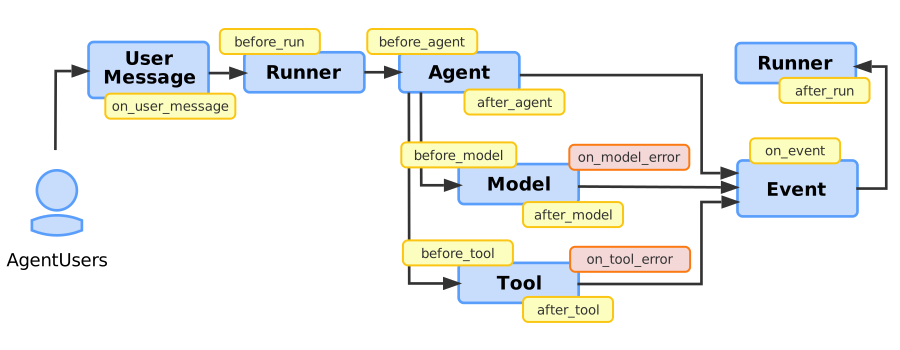 图 1. 带有插件回调钩子位置的 ADK 智能体工作流程图。
以下部分更详细地描述了插件可用的回调钩子。
用户消息回调
用户消息回调(on_user_message_callback)在用户发送消息时触发。它是第一个运行的钩子,让你有机会检查或修改初始输入。
- 何时运行:在调用
runner.run()后立即发生,早于任何其他处理。 - 目的:检查或修改用户原始输入的第一机会。
- 流程控制:返回
types.Content对象以替换用户的原始消息。
以下代码示例显示了此回调的基础语法:
运行器开始回调
运行器开始回调(before_run_callback)在 Runner 对象接收可能已被修改的用户消息并准备执行时触发。在任何智能体逻辑开始之前,此回调允许进行全局设置。
- 何时运行:在
on_user_message_callback之后,当Runner准备执行且在任何智能体逻辑开始之前。 - 目的:在调用运行之前进行全局设置或初始化。
- 流程控制:返回
types.Content对象以停止执行:Runner提前退出并以该内容作为结果结束运行。在 Python 中,此提前退出适用于每个根智能体,包括LlmAgent或Workflow。返回None以正常继续。
以下代码示例显示了此回调的基础语法:
智能体执行回调
智能体执行回调(before_agent、after_agent)在 Runner 对象调用智能体时发生。before_agent_callback 在智能体的主要工作开始之前立即运行。主要工作包括智能体处理请求的整个过程,可能涉及模型或工具调用。在智能体完成所有步骤并准备好结果后,after_agent_callback 运行。在 Python 中,如果智能体的运行引发异常,则 on_agent_error_callback(*, agent, callback_context, error) 会代替 after_agent_callback 运行。该回调仅观察失败:它的返回值被忽略,原始异常仍会被引发。
注意:实现这些回调的插件在智能体级别回调执行之前执行。此外,如果插件级别的智能体回调返回了除 None 或空响应之外的任何内容,则智能体级别回调不执行(被跳过)。
有关作为智能体对象一部分定义的智能体回调的更多信息,请参阅回调类型 (Types of Callbacks)。
模型回调
模型回调(before_model、after_model、on_model_error)在模型对象执行之前和之后发生,或者在模型调用失败时发生,详情如下:
- 如果智能体需要调用 AI 模型,
before_model_callback首先运行。 - 如果模型调用成功,
after_model_callback接下来运行。 - 如果模型调用因异常而失败,则触发
on_model_error_callback,从而允许平稳恢复。
注意:实现 before_model 和 after_model 回调方法的插件在模型级别回调执行之前执行。此外,如果插件级别的模型回调返回了除 None 或空响应之外的任何内容,则模型级别回调不执行(被跳过)。
模型错误回调详情
模型对象的错误回调工作方式如下:
- 何时运行:在模型调用期间引发异常时。
- 常见用例:平滑的错误处理、记录特定错误,或返回后备响应(如“AI 服务当前不可用”)。
- 流程控制:
- 返回
LlmResponse对象以抑制异常并提供后备结果。 - 返回
None以允许引发原始异常。
注意:如果模型对象的执行返回了 LlmResponse,系统将恢复执行流程,after_model_callback 将正常触发。
以下代码示例显示了此回调的基础语法:
工具回调
插件的工具回调(before_tool、after_tool、on_tool_error)在工具执行之前或之后发生,或者在发生错误时发生,详情如下:
- 当智能体执行工具时,
before_tool_callback首先运行。 - 如果工具执行成功,
after_tool_callback接下来运行。 - 如果工具引发异常,则触发
on_tool_error_callback,让你有机会处理失败。如果on_tool_error_callback返回字典,after_tool_callback将正常触发。
注意:实现这些回调的插件在工具级别回调执行之前执行。此外,如果插件级别的工具回调返回了除 None 或空响应之外的任何内容,则工具级别回调不执行(被跳过)。
工具错误回调详情
工具对象的错误回调工作方式如下:
- 何时运行:在工具
run方法执行期间引发异常时。 - 目的:捕获特定的工具异常(如
APIError),记录失败,并向 LLM 提供用户友好的错误消息。 - 流程控制:返回
dict以抑制异常,提供后备结果。返回None以允许引发原始异常。
注意:通过返回 dict 抑制异常后,系统会恢复流程,after_tool_callback 将正常触发。
以下代码示例显示了此回调的基础语法:
事件回调
事件回调(on_event_callback)在智能体产生输出(如文本响应或工具调用结果)时触发,这些输出会被封装为 Event 对象。on_event_callback 为每个事件触发,让你在将其流式传输到客户端之前进行修改。
- 何时运行:在智能体产生
Event之后但发送给用户之前。智能体的一次运行可能产生多个事件。 - 目的:用于修改或丰富事件(例如添加元数据),或基于特定事件触发副作用。
- 流程控制:返回
Event对象以替换原始事件。在 Python 中,ADK 会将你的事件合并到原始事件上:只有你设置的字段会被应用,而id、invocation_id和timestamp始终来自原始事件。
以下代码示例显示了此回调的基础语法:
运行器结束回调
运行器结束回调(after_run_callback)在智能体完成其整个过程且所有事件都已处理后发生,此时 Runner 完成其运行。它是最终的钩子,非常适合资源清理和最终报告。
- 何时运行:在
Runner完全完成请求执行之后。 - 目的:执行全局清理任务,如关闭连接、汇总结算日志或指标数据。
- 流程控制:此回调仅用于后续处理,无法更改最终结果。
以下代码示例显示了此回调的基础语法:
在 Python 中,ADK 会向你的插件通知另外两个生命周期事件:
on_run_error_callback(*, invocation_context, error):当运行因未处理的异常而失败时,代替after_run_callback运行。该回调仅观察失败:它的返回值被忽略,原始异常仍会被引发。close():当你通过await runner.close()关闭Runner时,每个插件运行一次,而不是每次运行都运行一次。使用它来释放插件所拥有的资源,例如 HTTP 客户端或指标导出器。每次close()调用都受运行器的plugin_close_timeout限制,默认为五秒。
下一步
查看以下资源以开发插件并将其应用到你的 ADK 项目中:
- 有关更多 ADK 插件代码示例,请参阅 ADK 示例仓库 (ADK Samples Repository)。
- 有关将插件用于安全目的的信息,请参阅 用于安全护栏的回调与插件 (Callbacks and Plugins for Security Guardrails)。